Beer Pong Tournament Corporate Event: Alcohol-Free, 90 Minutes
Jump to the FAQAt a corporate event, beer pong comes with particular side conditions: it should take ninety minutes and not three hours, nobody may be pushed into drinking, and the colleague from accounting should be able to join in just as much as the three from sales who have clearly done this before. This article shows how a beer pong tournament corporate event slot fits a fixed window, and how to set it up without anyone having to install an app or drink alcohol.
How to create a tournament in general is covered in Organize a beer pong tournament. This one is about what is specific to the workplace context.
What is different at a work event
The time window is the evening schedule. Between dinner and the part where the music gets louder there is about an hour to ninety minutes. Anything longer frays.
Taking part is voluntary, and that has to stay visible. There are colleagues who do not drink, cannot, or simply do not feel like it. A format where not taking part stands out is not a good format for a work event.
Skill is extremely unevenly spread — and unlike at a bachelor party that is not a joke here, it is a problem. Someone who loses their first match to the sales crowd and then sits out has a worse evening than before.
Nobody wants to set up personal devices. Asking people to install an app for a drinking game rarely lands well at a company function.
90 minutes: the maths
Two levers determine the duration — cup count and number of tables. At 6 cups a match takes around 10 minutes instead of the 15 at 10 cups.
| Teams | Tables | Cups | Format | Duration |
|---|---|---|---|---|
| 8 | 2 | 6 | Double Elimination | approx. 1 h |
| 8 | 1 | 6 | Double Elimination | approx. 2 h |
| 12 | 3 | 6 | Group stage + knockout | approx. 1.5 h |
| 16 | 3 | 6 | Double Elimination | approx. 1.5 h |
| 16 | 2 | 10 | Double Elimination | approx. 3 h |
The last row is the trap: the same sixteen teams, but the wrong settings, and the slot becomes the whole evening. If you change only one thing, change the cup count.
With 24 people, twelve pairs is the obvious split. If it gets bigger, play 3 vs. 3 instead — eight teams of three are considerably quicker than twelve pairs and everyone is involved.
What you need in terms of equipment
If the venue supplies the equipment, ask for numbers anyway — “we have beer pong” often means one table and twelve cups.
Per table you need 20 cups in play plus a spare set, two to six balls, a cup of water for rinsing and paper towels. If you play alcohol-free, add jugs or canisters, because the throwing cups get refilled between matches.
Space: a set-up table is around 2.44 metres long and 61 centimetres wide, so with throwers at both ends about 3.5 by 1.5 metres. Three tables therefore need a good ten metres of wall — in a restaurant’s function room that is the limit worth clarifying in advance.
Which format: Double Elimination
For this occasion Double Elimination is almost always the right pick. Lose your first match and you land in the loser bracket, still in the tournament. So every team plays at least twice — that is the difference between “that was fun” and “we played for twenty minutes and then watched for two hours”.
At twelve teams and with more time, a group stage followed by a knockout is better still, because everyone gets three or four matches in the preliminary round. It needs at least six teams; with awkward numbers the groups end up different sizes.
Pure knockout is the worst option here, even though it is the quickest. Sorting out half the workforce after twenty minutes is not a team event.
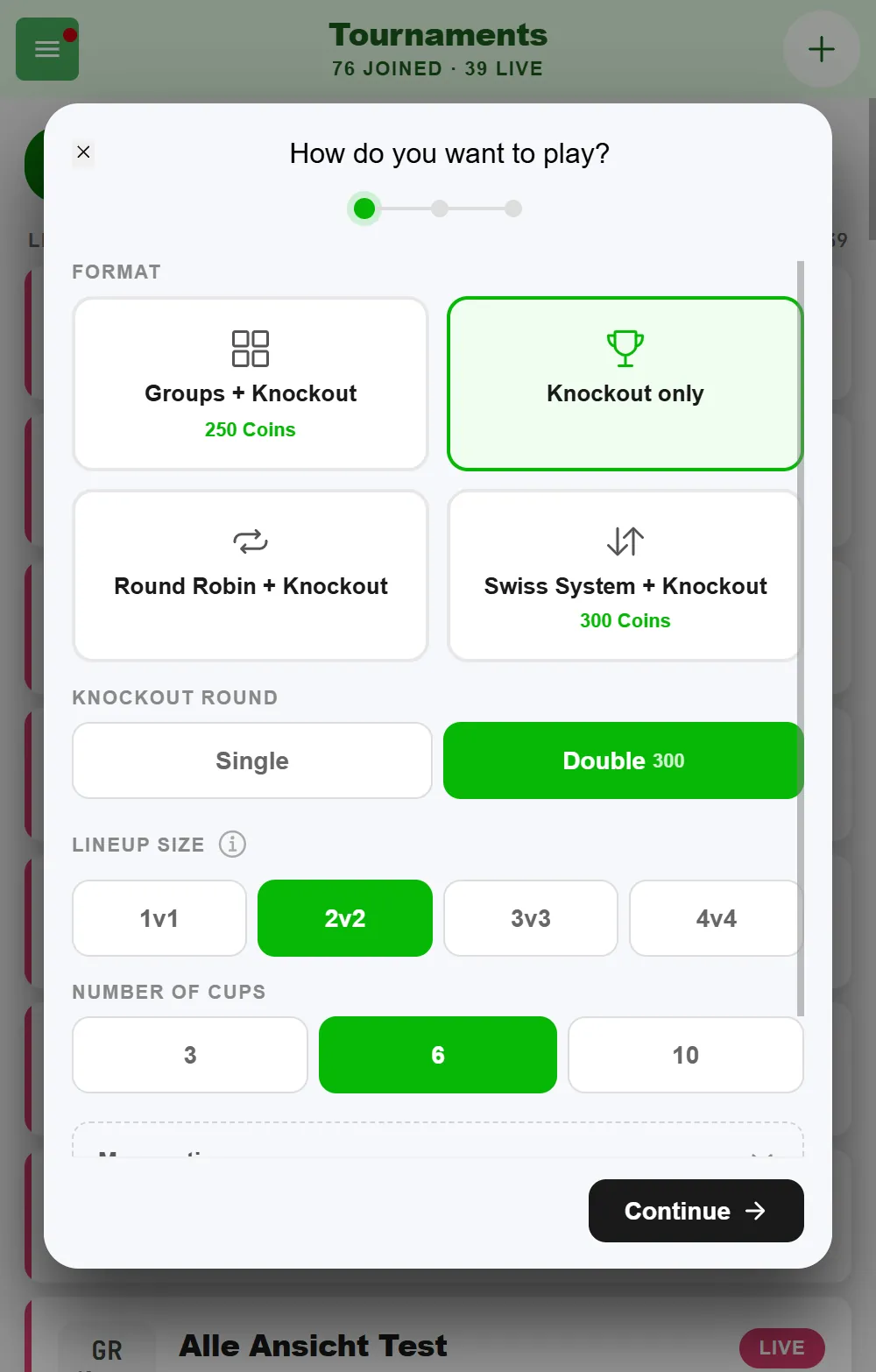
When you create the tournament, pick “Knockout only” as the format and “Double” as the knockout round. Double Elimination costs Coins at the start of the tournament — the price is shown right on the option, while a single knockout is free. What a tournament costs overall is covered in Organize a beer pong tournament.
You do not need to even out awkward team counts: a pure knockout in BeerpongMe needs at least four teams and no power of two — missing slots become byes that count as won straight away.
Alcohol-free is the better option
Not out of caution, but because it works better in practice.
BeerpongMe counts hits, not drinks. What goes in the cups is your decision — the tournament runs exactly the same with water, standings and statistics included. At a corporate event that has three concrete advantages:
- Everyone can play, including whoever is driving, pregnant, on medication or simply not drinking. That keeps the voluntary part genuinely voluntary rather than formally so.
- The evening stays predictable. Sixteen cups per match add up, and nobody should have to delete the second half of a work function from memory.
- It becomes a game of skill rather than a drinking game — and therefore a contest you can win without being particularly good at drinking.
Common setup: water in the throwing cups, drinks of choice at the bar next to it. Anyone who wants to drink the cup they lost drinks from their own glass.
Mixing teams across departments
The actual reason such a tournament is on the schedule. Two things that help:
Draw teams rather than letting people form them. If teams find each other, every department ends up among itself afterwards — precisely what the evening was meant to avoid. Slips in a bowl, draw, done.
Pair experienced with inexperienced. Somebody who plays often goes with somebody who never has. That is fairer and incidentally makes sure somebody actually explains the rules.
For colleagues who do not want to throw there is a role: add them as referees in the tournament settings. They can start matches, enter results and finish them without playing. That is better than leaving them standing next to it — and it takes work off whoever organized the tournament.
Step by step: setting up the slot
- Create the tournament the day before. You do not want to start this at the event itself.
- Pick the lineup size: 2 vs. 2 up to 24 people, 3 vs. 3 above that. It cannot be changed after the start.
- Set the cup count to 6. That is the single most important setting for a ninety-minute window.
- Format: Double Elimination, with a group stage in front at twelve teams and more time.
- Write the house rules — the free-text field takes up to 2000 characters. Put in what is in the cups, whether cups that are hit get drunk at all, and who refills. Every player sees the rules inside the tournament, which heads off the discussion at the table.
- Enter teams as local teams — while creating the tournament, paste them as a list into the “Teams” field, one line per team: team name, then the players, separated by commas. No account, no install, no work or personal contact details. Details in Beer pong tournament with players who have no account.
- Add one or two referees and start the tournament.
During the tournament you tap the cups you hit at the table; the bracket advances itself with every result. Re-rack, redemption and overtime are walked through on screen as soon as the situation comes up, so nobody has to know the rules by heart. If you’d rather just record the final score, enter it directly with “Enter result” on the game card.
Showing the standings in the room
If there is a projector or a TV, put the bracket on it. At a corporate event that has an extra effect: the people not playing have something to look at and talk about, and the tournament becomes a topic rather than a side event in the corner. If the tournament has to fit between two agenda items, set up your tables beforehand in the “Tables” tab of the tournament settings: the schedule then shows table and approximate start time for every game, and everyone knows when they need to be back at the table.
New tournaments are public by default — the bracket can then be opened on any phone, no login needed. Think for a moment about whether your staff list should be publicly readable on the web. For an internal event the private mode is usually the right call: switch off “Public” under “More options” when you create the tournament, and the bracket on the projector is plenty.
Who this article is not for
If it is an evening with open sign-ups and more than 24 teams, Beer pong tournament college party fits better. For an event with a mixed public including minors, the procedure is in Beer pong tournament club event. And if you do not want a tournament at all, just a few matches tracked on the side, a quick match is enough.
Frequently asked questions
How do I fit a beer pong tournament into 90 minutes?
Through the cup count and the team size. At 6 instead of 10 cups a match takes around 10 minutes. Eight teams on two tables in Double Elimination are done in a good hour; twelve teams need a third table.
Does beer pong work at a corporate event without alcohol?
Yes. BeerpongMe counts hits, not drinks — what goes in the cups is up to you. For a work event, water in the throwing cups is the common choice, because nobody can be required to drink and everyone can still play.
Do colleagues have to install the app?
No. One person creates the tournament and enters all teams as local teams — names only, no account, no sign-up. At a corporate event that is the normal case and it avoids the discussion about personal devices.
How do I build fair teams when skill levels differ a lot?
Mix departments and pair an experienced player with an inexperienced one. The format helps too: with Double Elimination every team stays in for at least two matches instead of being knocked out after one loss.
What about colleagues who do not want to play?
Add them as referees. They can start matches and enter results without throwing themselves — involved, without having to step up to the table.