Fast Game: Start a Spontaneous Beer Pong Match in 30 Seconds
Jump to the FAQJust want to play beer pong - no league, no tournament, no setup hassle? That’s exactly what the Fast Game in the BeerpongMe app is for. Fast Game mode is the shortest path between “up for some beer pong” and “first ball is flying”: create a lobby, share the link or QR code, track the score - done. This article shows you how to start a match in under a minute, what the app counts for you in the background, and why all of it works without an account too.
What is a Fast Game in BeerpongMe?
A Fast Game is the most spontaneous way to play in the BeerpongMe app. It’s not a tournament, not a league match, and not a mandatory match - it’s simply a match between two teams - from 1-vs-1 to 4-vs-4 - that gets tracked live in the app. Unlike with a league or tournament, you don’t need to set up a season, define matchups, or maintain a table.
Fast Game is made for:
- House parties and spontaneous get-togethers with friends
- Bachelor/bachelorette parties and birthdays
- Bars and pubs that run beer pong tables without their own league
- Practice sessions between two established beer pong teams
- anyone who wants a digital beer pong scorekeeper instead of tally marks on the back of a coaster
Starting a Fast Game - step by step
Creating a Fast Game in BeerpongMe takes under a minute. You don’t need an account for it - the mode works completely as a guest player.
- Open the BeerpongMe app in your browser (beerpongme.com) or as an installed Android app.
- Tap “Fast Game” in the menu (alternatively: go directly to beerpongme.com/fast-game). If you’re not logged in, you’ll find the “Fast Game” button right on the start page.
- Tap “+” in the top right and choose “Start Game”. Logged in or as a guest - both work; if you’re logged in, the results are added to your BeerpongMe statistics.
- The lobby is ready right away: at the top you see the 6-digit lobby code. Tap it to open the share sheet: the “Link” tab has the code and the join link, the “QR code” tab has the code to scan, and below are the “Share” and “Copy” buttons.
- The gear icon next to “Fellow players” opens the lobby settings: the number of players (2 to 8 - so 1-vs-1 to 4-vs-4). You can also decide whether the match can be watched publicly once it starts - that only controls whether strangers can follow along live, not who can join. “Content sharing” decides whether your fellow players and spectators may share the result image; if it’s off, only you can. The setting is locked in for this match once it starts.
You can send the join link directly to fellow players via WhatsApp, Instagram, Signal, or Discord. Anyone who opens the link automatically lands in the same lobby - the QR code works via the camera app of any modern smartphone.
Joining by code or QR only: your lobby doesn’t show up in any public list. There are exactly two ways in - the 6-digit lobby code (or the join link) or a QR scan at the table. That way only the people you actually invited end up playing.
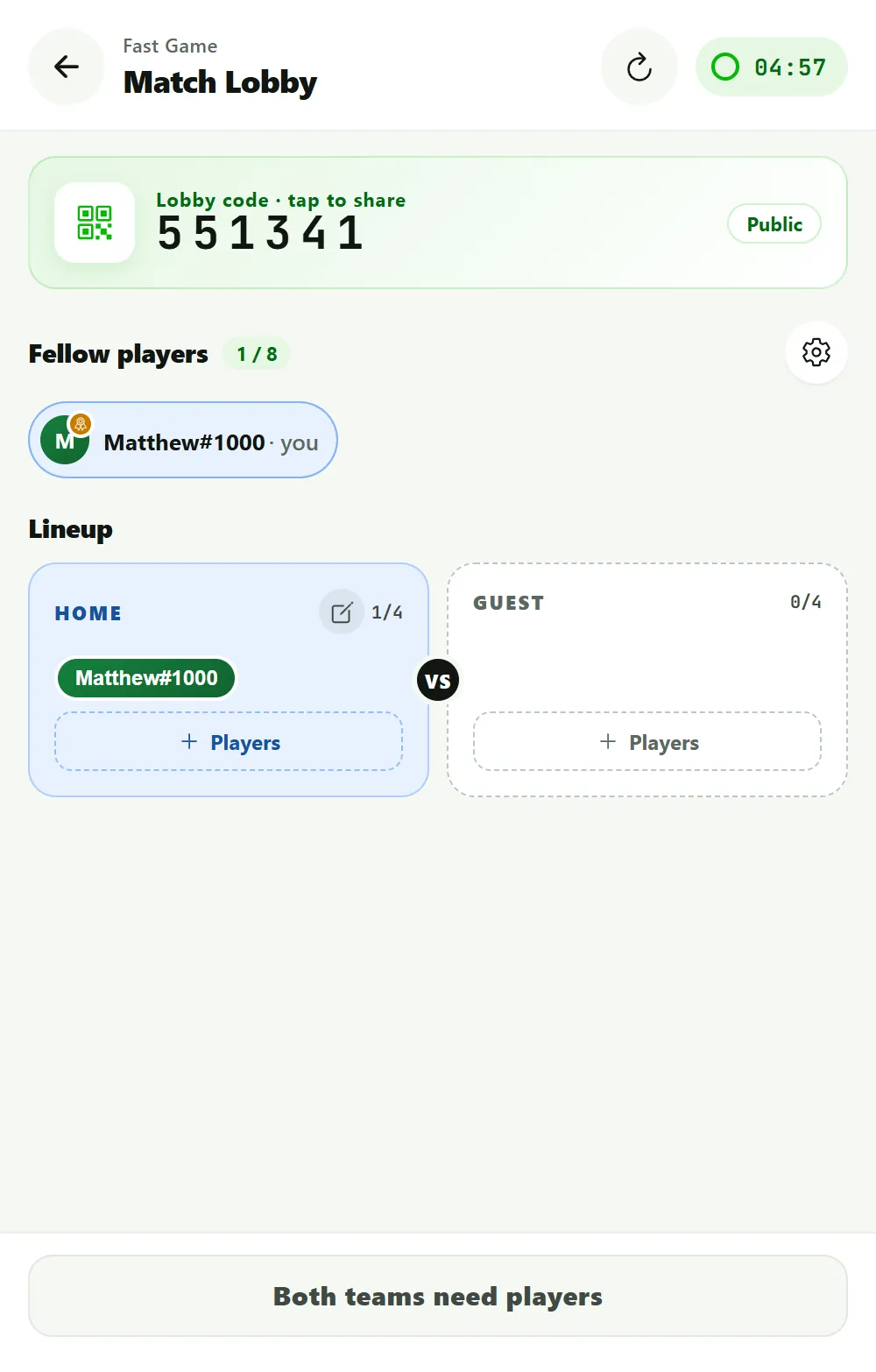
To join, the other players tap “+” → “Join the lobby” on the Fast Game screen and enter the code - or pick “Scan” and point the camera at the QR code.
During the match: live scoring in the app
As soon as both teams are in the lobby, the actual match starts. BeerpongMe now takes over the live scorekeeper job: for every shot, the active team taps which cup was hit - the app automatically calculates:
- the current score (cups remaining per team)
- hits and shots per player
The score is synced in real time via WebSocket - everyone involved, and all spectators, see the same numbers without pressing a refresh button. That makes BeerpongMe a full-fledged beer pong live tracker.
On top of that there’s a live ticker: it lists every hit with player, time, and running score, plus special shots, reracks, overtime, redemption, and the end of the match. On a phone you open it from the header of the match screen; on wide screens it sits next to the match as its own column. If a hit was entered by mistake and taken back, the entry stays in the ticker, struck through. Misses don’t appear in the ticker.
Sharing the match & inviting spectators
Every Fast Game in BeerpongMe has its own public watch URL in the form /fastgame/watch/<code>. This link can be shared - anyone who opens it sees the current score in real time, but can’t make any inputs. Ideal for:
- Friends who want to watch but not play
- Bars that want to display the match on a TV screen in the room
- Streaming on Twitch or Instagram Live - the watch URL runs in any browser
- WhatsApp status updates with a live link
On the watch page, alongside the score, you can also see the players’ hits/shots, the cup arrangement on both sides, and the live ticker.
What happens after the match?
As soon as the last cup is hit, the app automatically ends the match and shows a results screen:
- the final score (e.g., 10:4) and the winning team
- hits and shots per player
- a “Share results” button: it creates a ready-made result graphic with the final score and the players, as a Story, Post, Square or Web landscape image. Send it to Instagram, WhatsApp and the like with “Share”, or keep it on your phone with “Save”
If you’re logged in, your match data flows into your BeerpongMe player profile and becomes part of your lifetime statistics. You can find a detailed article on the stats system under Track beer pong stats.
Fast Game or league / tournament - what fits me?
If you regularly play with the same teams and want a real season with a table, standings, and long-term stats, a beer pong league is the right choice. A one-time multi-team event with a bracket belongs in a beer pong tournament. For everything else - a spontaneous match, a house party, a bar table, a practice session - Fast Game is the right tool.
The charm: you can also combine the three modes. Fast Game results don’t count toward your league table, but they do flow into your personal player statistics.
Play beer pong without installing an app
One point that’s crucial for spontaneous games: BeerpongMe runs as a Progressive Web App (PWA) entirely in the browser - no app store download, no account required for fellow players. Whoever opens the link is in. That’s the main difference from traditional beer pong score apps, which require a separate app installation for every player.
For regular use, it’s worth installing the Android app (in the Google Play Store under “BeerpongMe”) or adding the PWA to your home screen. Both are optional.
Frequently asked questions
Do I need an account to start a Fast Game?
No. A Fast Game can be started entirely without registration - as a guest player. If you want to track your statistics long-term, though, it's worth signing up for free with an email address.
Can spectators follow a Fast Game live?
Yes. Every Fast Game generates a watch URL in the form /fastgame/watch/<code>. Anyone who opens this link sees the score in real time - no account and no app installation required.
How many cups per team are played in a Fast Game?
It's played with 10 cups per side - the classic 10-cup pyramid.
Do Fast Game results count toward my statistics?
Yes, as long as you're logged in. Your hits, shots, and match results flow directly into your BeerpongMe player profile and into your teams' statistics.