Organize a Beer Pong Tournament - Bracket Tool for 8 to 64 Teams
Jump to the FAQOrganizing a beer pong tournament is one of the most common use cases for the BeerpongMe app - whether it’s a bachelor party, a student event, a bar tournament, or an in-house company battle. While a league (see Create a beer pong league) runs over several weeks, a tournament is a one-off event with a bracket and a winner crowned in a single day. This article shows you how to create a beer pong tournament and manage it while the event is running, which tournament formats are available, and how to run large brackets with up to 64 teams without any spreadsheet chaos.
Which tournament format fits my event?
BeerpongMe combines an (optional) preliminary-round format with a knockout format. This results in five common tournament variants. Which one is right for you depends on team count, available time, and how competitive you want it to be.
| Format | Suited for | Duration | Special feature |
|---|---|---|---|
| Single Elimination | 8/16/32/64 teams, tight time window | short | One loss = out |
| Double Elimination | 8–32 teams, serious competition | medium | Loser bracket - second chance |
| Group Stage + Knockout | 12–32 teams, many games per team | long | Groups first, then knockout |
| Round Robin | 4–8 teams, league-like in one day | very long | Everyone plays everyone |
| Swiss System | 12–24 teams, odd numbers | medium | Fair pairing based on performance |
For bachelor-party tournaments with 8 teams, single or double elimination is ideal. For student events with 16–24 teams, the group stage followed by a knockout bracket is the fairest format - every team plays several matches.
With a preliminary round you can also drop the knockout round entirely: then the table alone decides who wins - handy for a relaxed evening where everyone plays everyone and nobody is out early.
Step by step: create a beer pong tournament
Here’s how to set up a tournament in the app:
- Log in at beerpongme.com or in the Android app.
- In the main menu, go to “Your Tournaments”, tap “+” at the top right and pick “Create a tournament”. On a computer, the “Create a tournament” button sits right in the header.
- Creating it takes three steps:
- How do you want to play? - the format (Groups + Knockout, Knockout only, Round Robin + Knockout, or Swiss System + Knockout), the knockout round (Single, Double or - with a preliminary round - No knockout), the lineup size (1v1 up to 4v4), the number of cups and - optionally - the planned start. With a preliminary round you set the cups for the preliminary and knockout rounds separately, for example 6 cups in the groups and 10 from the quarterfinals on. Under “More options” you’ll find rerack, “Last cup to the front”, first and second rounds, how many teams advance, the third-place match, and the toggles for joining, visibility and voting.
- Who’s in? - this is where you enter teams directly and get the invitation QR code plus a six-digit code for everyone who joins on their own.
- Name & Launch - the tournament name (5 to 32 characters), a summary of your choices, the “Before you start” checklist and the costs. You start right away or tap “Start later”.
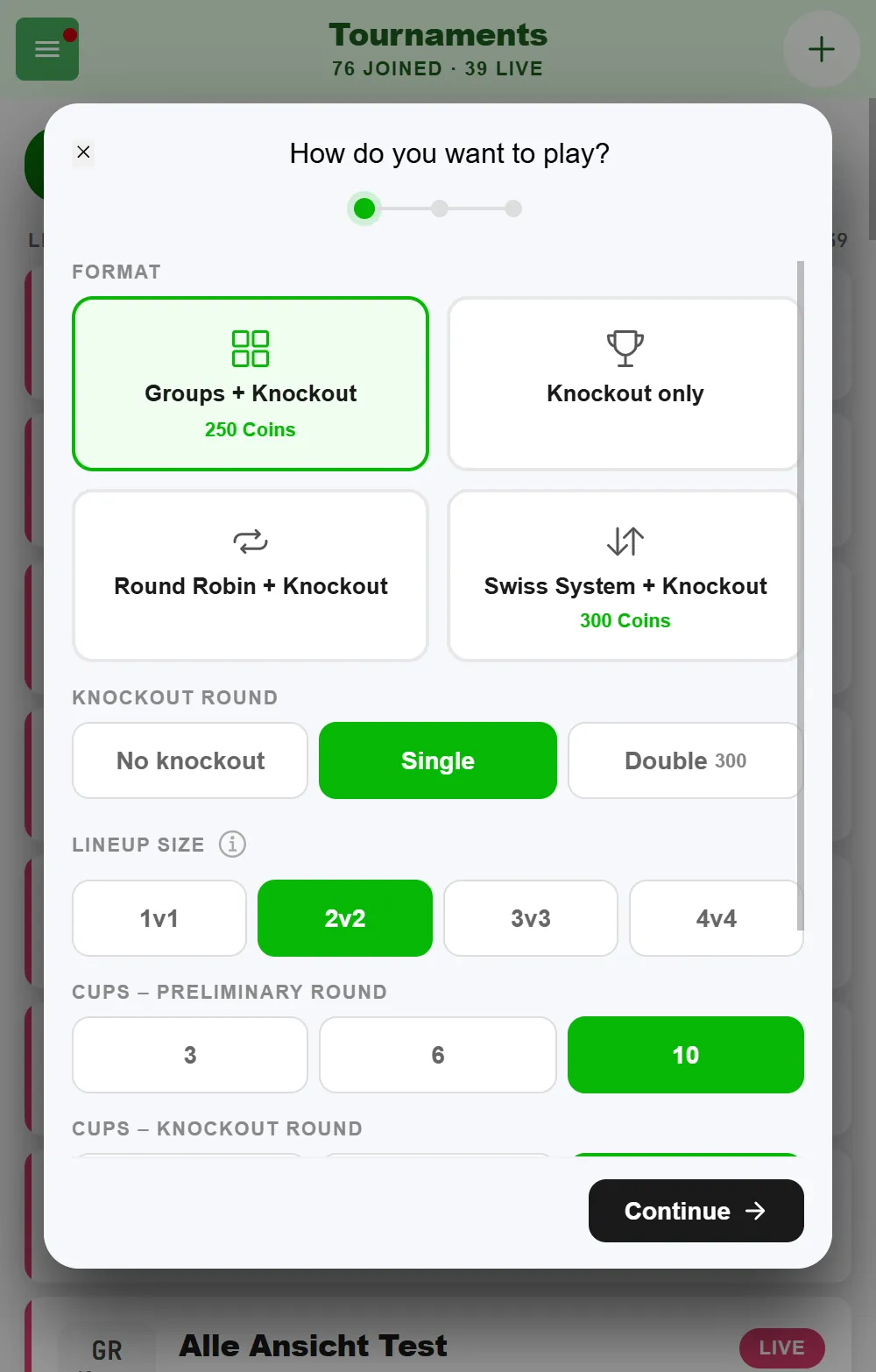
Good to know: as soon as you tap “Continue” after the first step, the tournament is already created - the invitation QR in step two needs it. If you cancel after that, you’ll find the tournament under “Your Tournaments” as not started and can finish setting it up or delete it there.
The planned start tells everyone when things kick off: the tournament overview then shows, for example, “Start Sat, 24.10. · 20:30” instead of “Start TBD”, and the tournament page and the public page get a line of their own for it. Tournaments that haven’t started are sorted by this date in the overview. Only you as the creator can change or remove it, in the tournament settings under “Tournament”, until the tournament is running. Important: the date is just a heads-up - the tournament doesn’t start by itself, only when you tap “Start a tournament”.
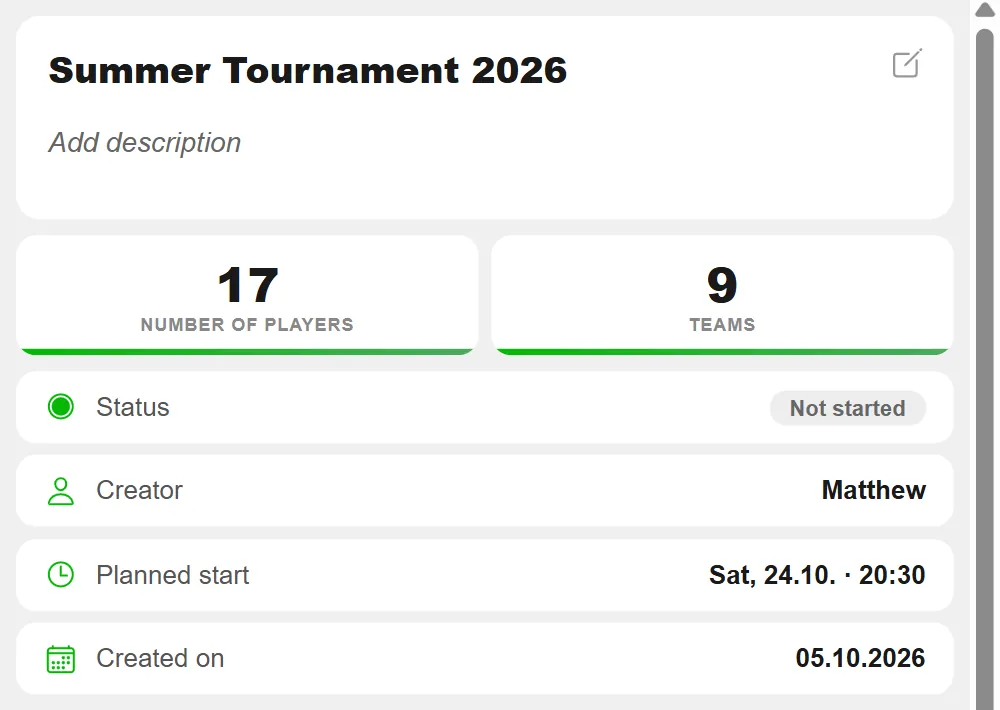
Everything you set while creating it can be changed until the start. In the tournament menu, that item is called “Start a tournament” before the start and “Settings” afterwards.
Inviting and entering teams
Teams get into the tournament in two ways: they join on their own, or you enter them.
Joining on their own works with the six-digit code or the QR code, which people scan with the scanner in the BeerpongMe app - there is no join link. You find both under “Share” on the tournament page, under “Join”. A public tournament also shows up in the “Discover” section - other BeerpongMe users find it there, but they still need the code or the QR to join.
Entering them yourself is quicker if you already know the teams. In step two of the creation flow you type them as a list into the “Teams” field: one line per team, team name first, then the players, all separated by commas. The app counts along whether you have enough teams and players - a group stage needs at least six teams. Since the comma is the separator, team and player names can’t contain one themselves.
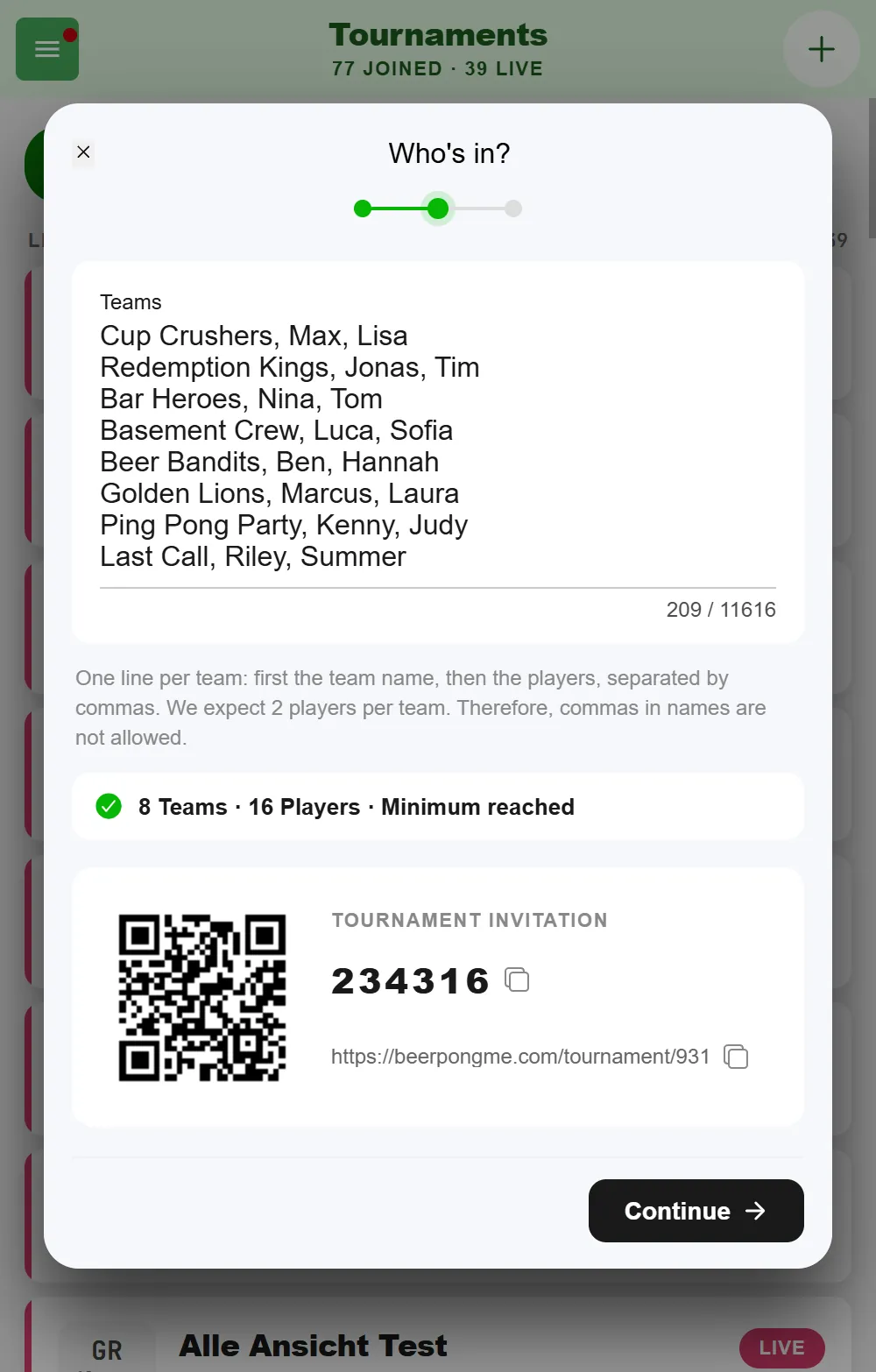
Teams entered this way are local teams: the players don’t need an account. You can also add them one by one later, via Teams in the tournament navigation. There you have three options: “Select a team” (an existing team from BeerpongMe), “Create a team” (found a new one) and “Local Team” - more on that below. With lots of teams, the search field in the Teams tab helps.
Contact information for questions
Anyone interested in your tournament usually has a question: are there spots left, when do doors open, is there an entry fee? On the tournament page you can store how to reach you under “Add contact information”: Email, Phone, Instagram, Facebook, WhatsApp and a Website. All fields are optional.
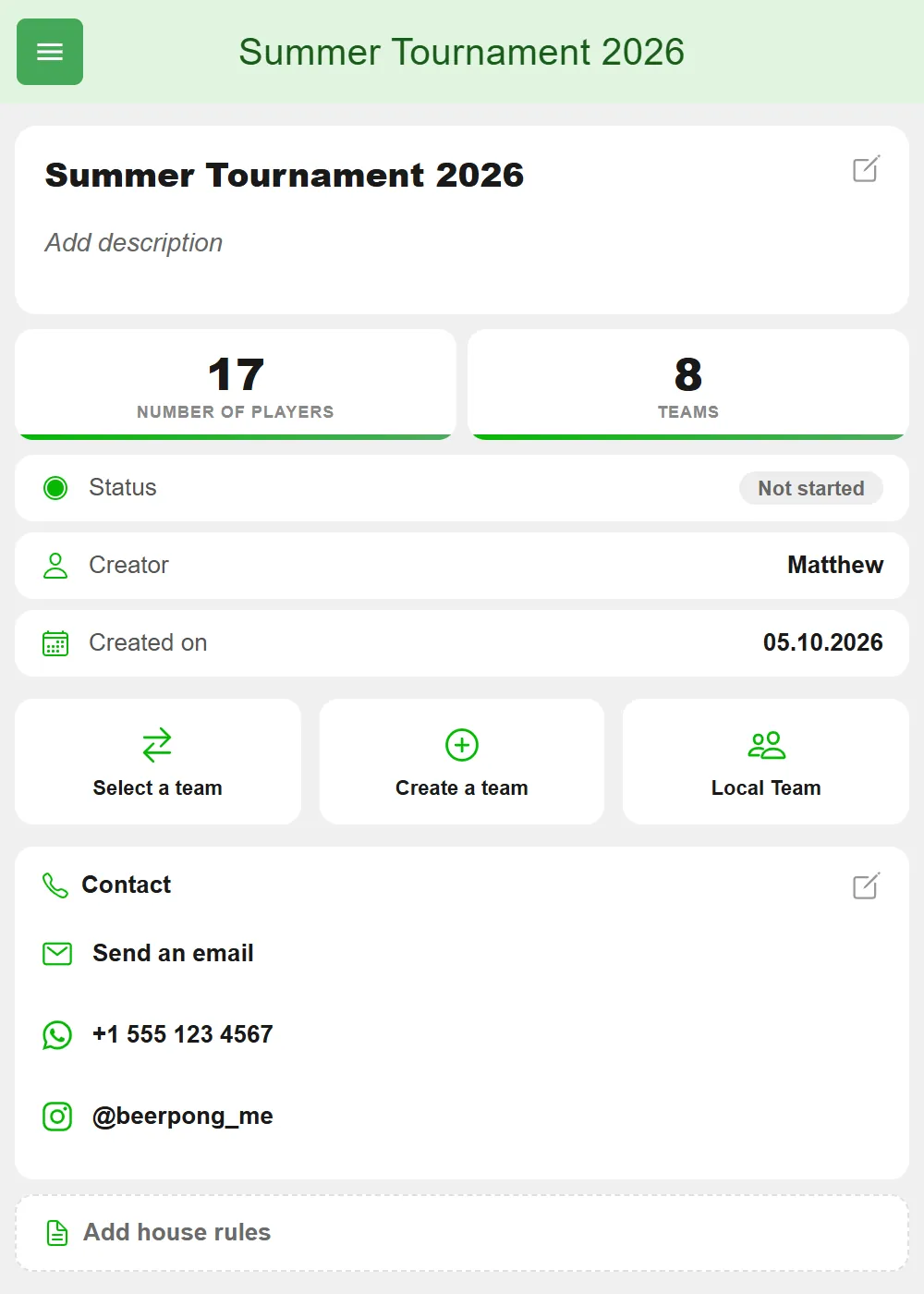
The details are public: as long as the tournament is private, only participants see them. In a public tournament they’re on the tournament page for everyone and can be found by search engines. That’s why your email address isn’t shown in plain text, only behind the “Send an email” button - which keeps spam harvesters away.
Lineups: who from the squad actually plays
A team in BeerpongMe can have up to 40 members, but only one to four of them stand at the table. That’s what the lineup is for: the selection of people actually competing in this one tournament - separate from the squad, meaning the team’s full member list.
You set the lineup size once for the whole tournament, from 1 vs. 1 up to 4 vs. 4. Important: it cannot be changed after the tournament has started. So decide up front whether you’re playing doubles or fours.
Here’s how to set a team’s lineup:
- In the tournament, go to Teams.
- Tap the pencil icon on the team you want.
- In the “Who’s in?” sheet you see the full squad. Pick the players who are competing - the counter at the bottom shows how many you’ve picked and how many are allowed.
- Tap “Apply”.
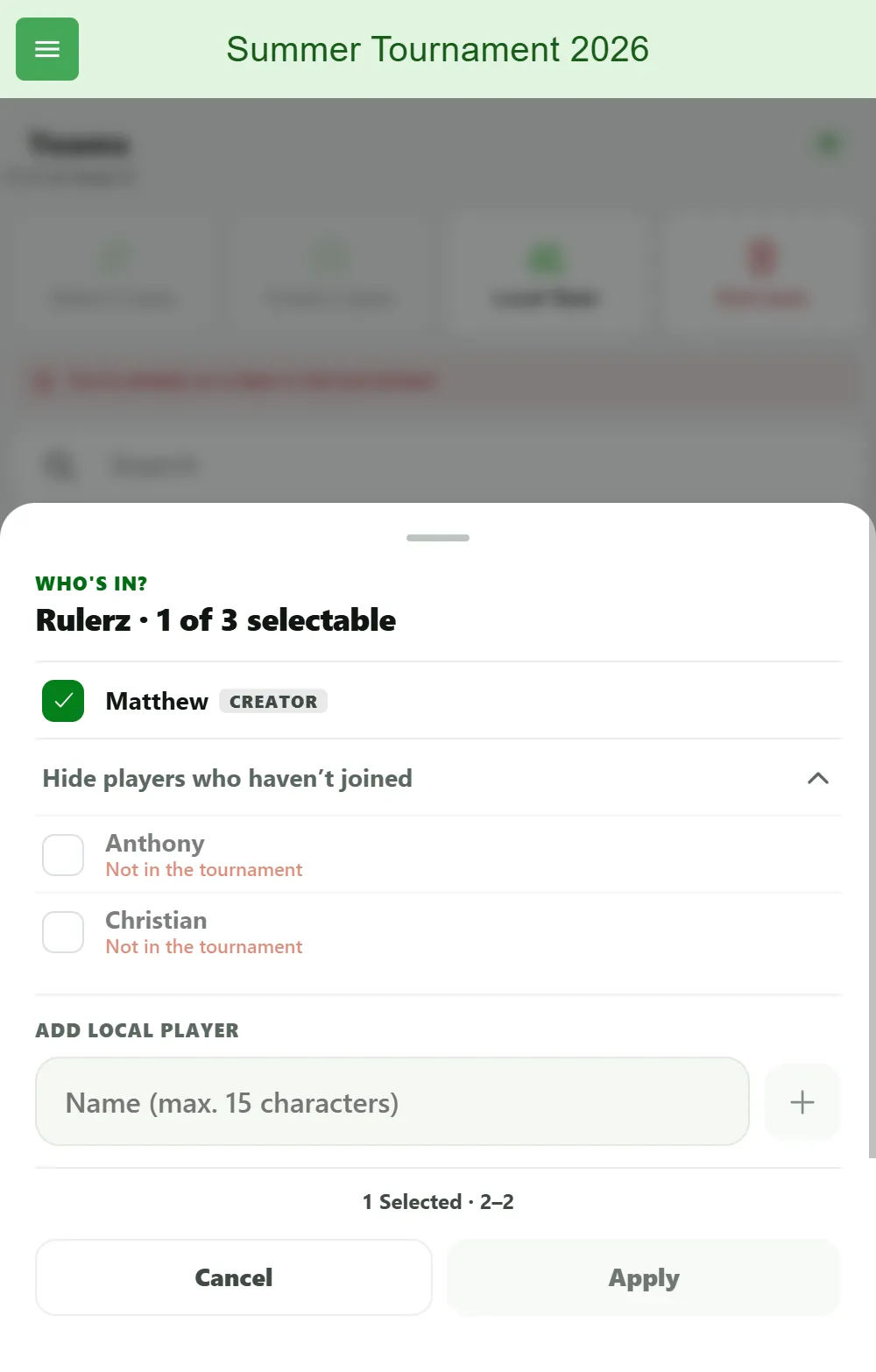
Every team carries its status in the list: “Lineup set” means done, otherwise it tells you what’s missing - for example “1 more players needed”. Individual members can be locked, with a note explaining why: the invitation is still open (they haven’t accepted the team invite yet), they’re playing elsewhere (they’re in another running match), or Not in the tournament (they haven’t joined it). Members who haven’t joined the tournament yet are collapsed under a line like “2 more haven’t joined”.
Who can set the lineup: you as the tournament creator for every team, plus the creator of the team itself and its admins, as long as they have the team permission “Set Lineup”. Which permissions team admins have is covered in Create a beer pong team.
Up until the tournament starts you can change the lineup again at any time via the pencil icon - so anyone who drops out at short notice is simply swapped. Only with the start is it frozen.
Forgotten lineups don’t block the tournament start completely: on start, BeerpongMe fills up the teams that have enough players who joined. It’s cleaner to go through them beforehand, though - otherwise chance decides who throws in the first match.
Players without an account: local teams
Almost every tournament has those two people who absolutely will not install an app. For them you create a local team: type in the names, done - one at a time via “Local Team”, or many at once as a list, as described above. Local players don’t need an account and show up in the tournament standings as normal, but they don’t collect statistics beyond the tournament.
Exactly how that works and where the limits are is covered in Play beer pong without an account.
Setting rules of play and house rules
Two things that often get mixed up.
Rules of play are what the app calculates along with you. You set them while creating the tournament or in the tournament settings:
- Cup count - 3, 6 or 10 cups per team. 10 is the classic, 6 and 3 are the quick variants for a packed tournament day. With a preliminary round there are two values, one for the preliminary round and one for the knockout round.
- Rerack - whether and when the remaining cups may be re-formed. Off means never. Fixed thresholds re-forms automatically as soon as 6 or 3 cups are left. Free choice leaves the timing and the formation to the players, with a limit on reracks per team. With 3 cups there is no rerack - you go straight to overtime there.
- Last cup to the front - if only one cup is left, it may be moved to the tip, once per rack and team.
House rules, by contrast, are a free text field (up to 2,000 characters) on the tournament page. That’s where everything goes that the app can’t count but that should still be settled: “bounce counts double”, “no reaching in”, “whoever picks the ball up off the floor drinks”. Every participant sees them in the tournament - which saves you the third argument at the table. After the tournament starts, house rules and the description are fixed and can no longer be changed.
Before you start: checklist and costs
What’s still missing before the tournament can get going is shown in the “Before you start” checklist - in step three of the creation flow and later under “Start a tournament”. It lists all open items at once: enough teams for the chosen format, a game format set, enough coins. Only once everything is ticked off can you start the tournament.
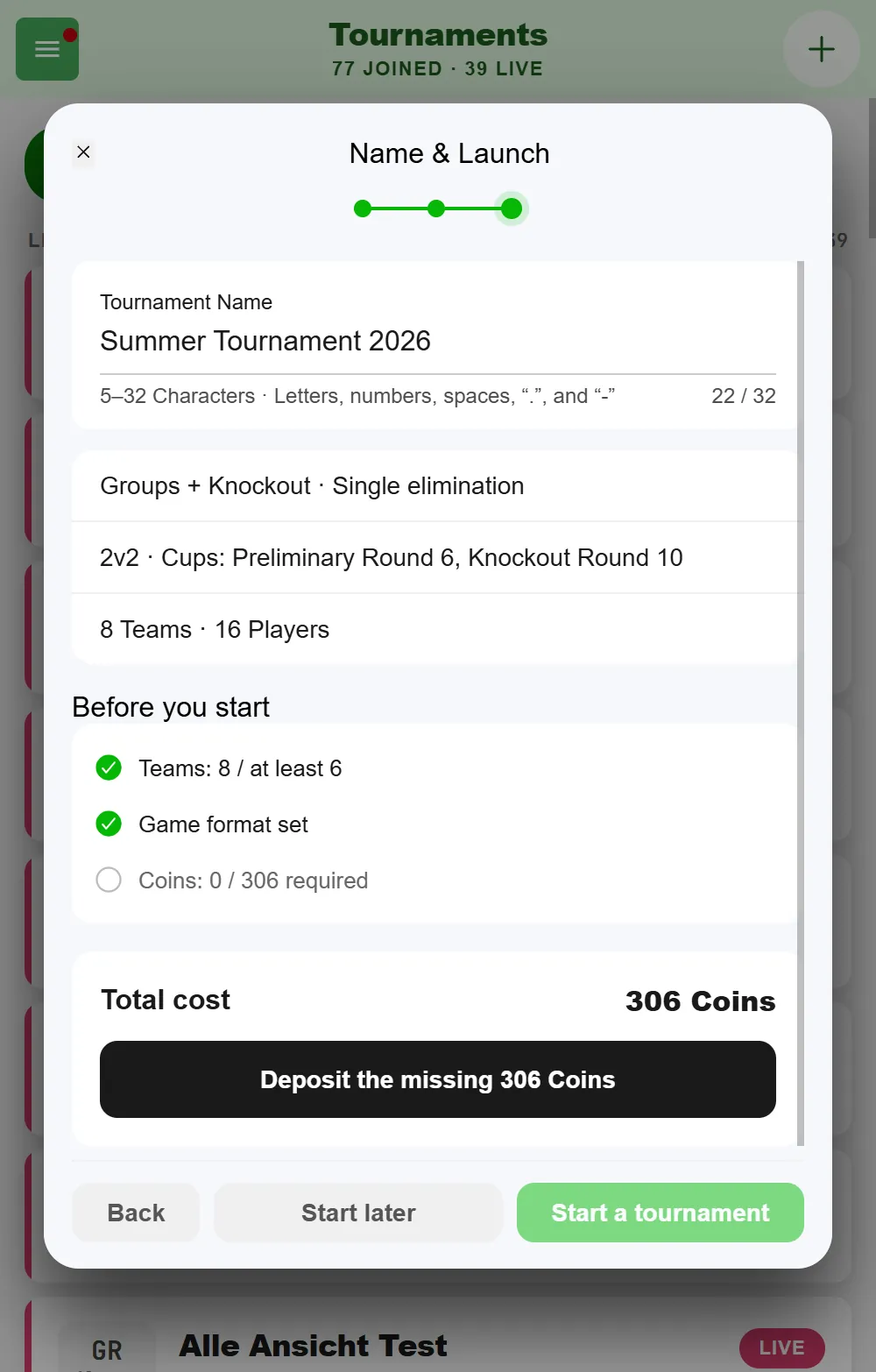
Creating a tournament is free, and there’s no limit on how many tournaments you create or join. You only pay on start, with coins. The amount is made up of:
- the format - Knockout only with single elimination and Round Robin are free; the group stage, the Swiss system and double elimination have a price shown right next to the option;
- extras like voting after matches;
- a surcharge for additional teams and additional players, calculated on lineup slots, not full squads - so a 40-strong club fielding a 2v2 team counts as two slots.
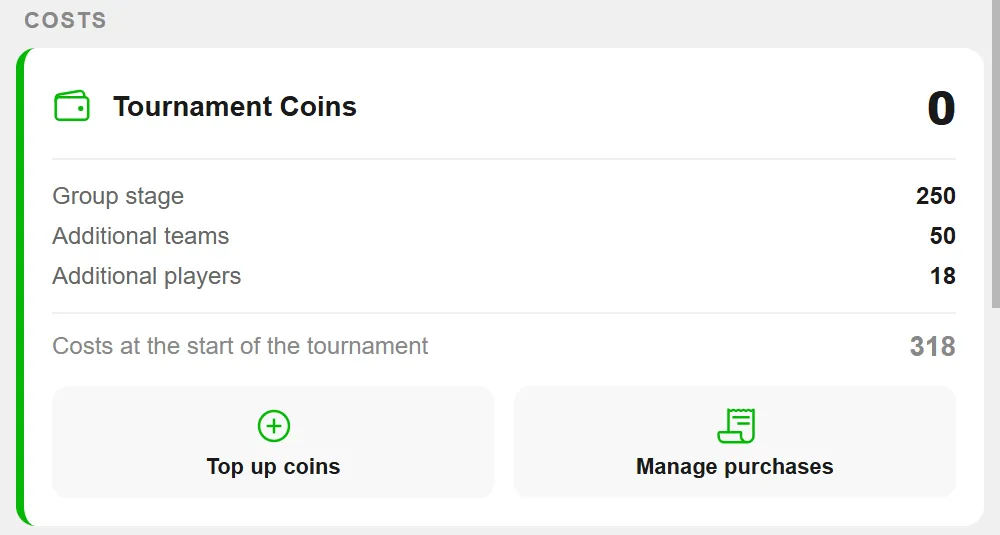
You see the breakdown before the start. If the tournament is short on coins, you can transfer the rest straight from your account with “Deposit the missing … Coins”; participants can also chip in together. Referees are free, and so are cup count, rerack and house rules. If you delete a tournament that has already started, you don’t get the paid coins back.
Manage a beer pong tournament: the live bracket during the event
Once the tournament is underway, BeerpongMe tracks the matches live. You can display the bracket or the schedule on a TV screen at the venue - all spectators can see who’s playing next against whom. The public tournament page reloads itself, roughly every ten seconds, so nobody has to hit refresh on the TV. There, the preliminary round standings and the knockout bracket sit together under “Results”, with a switch between the two stages.
Matches are recorded via live scoring: teams track every throw in the app. Since version 3.0 there is only one match screen for that - the same one a spontaneous Fast Game runs on. You see the cup pyramid of both sides, tap the cups that were hit, and everybody involved plus any spectators sees the score in real time. Rerack, redemption and overtime are walked through step by step as soon as the situation comes up.
Every match also has a Live ticker: it lists every hit with player, time and score, plus special shots, reracks, overtime, redemption and the end of the match. On a phone you open it from the header; on wide screens it sits as a column to the right. If a hit gets corrected, the old entry stays in the list, struck through - so you can always see what happened.
Besides the tournament creator, referees can also start matches, enter results, and finish them - to do this, add neutral people under “Referees” in the tournament settings. That way, a playing team doesn’t necessarily have to do the scoring itself. Anyone helping you run things without being a referee gets the right permissions under “Admins”, for example to remove teams and players.
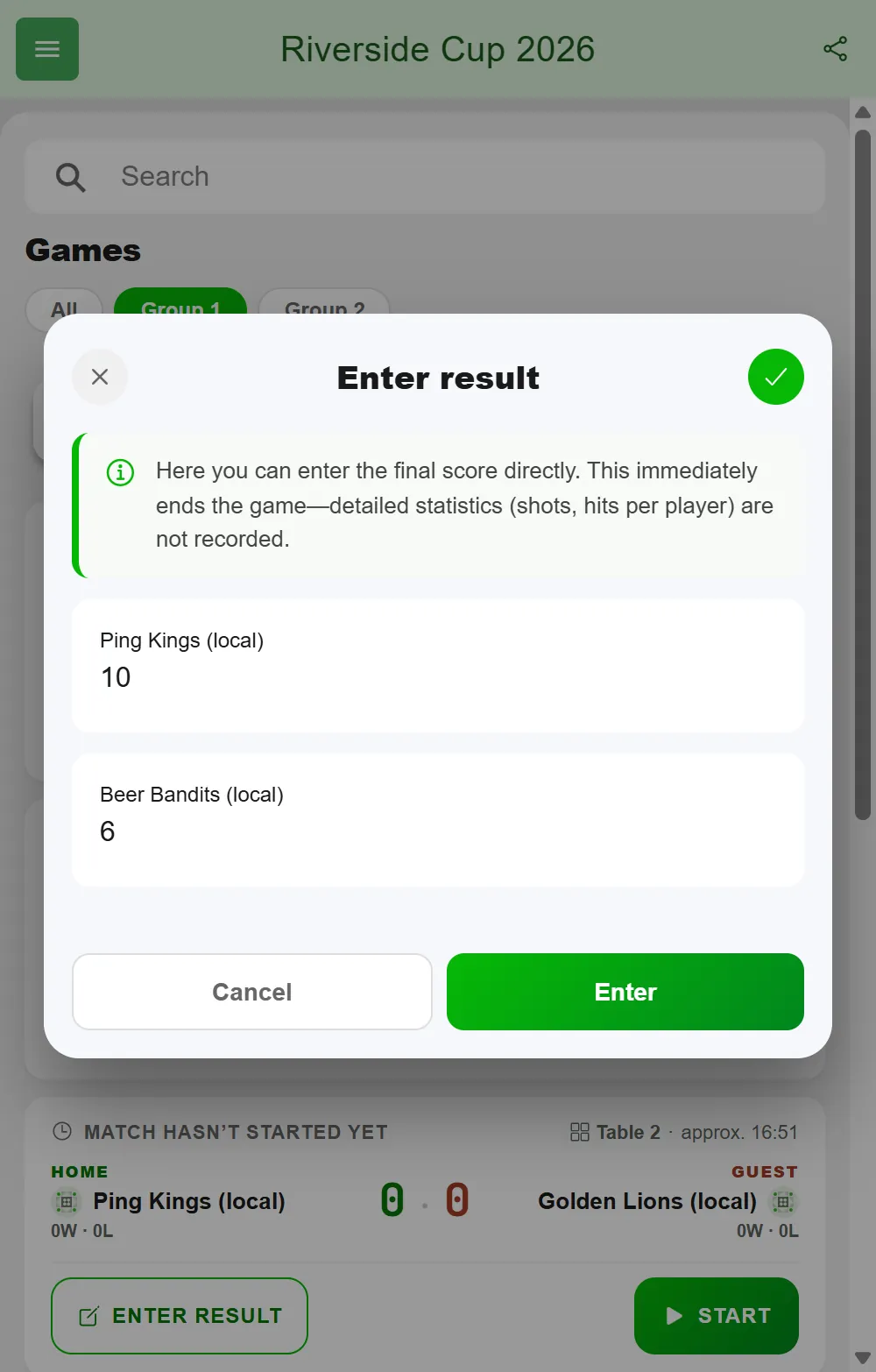
Not every game has to be tracked throw by throw. If a table kept score on paper or someone forgot to start the match, tap “Enter result” on the game card and enter just the final score - values from 0 to 99, and there are no draws. The game ends right away and the winner moves on. Throws, hits per player and hit rate are not recorded; the match page shows the note “Final score entered directly” instead. If the game is already running, the app asks first, because the current score is discarded. The creator, referees and admins can enter results - admins can’t start a match, though.
As soon as a match is completed, the winner advances to the next round. In double elimination, the loser drops into the loser bracket and gets a second chance - the bracket updates with every result, with no manual upkeep required.
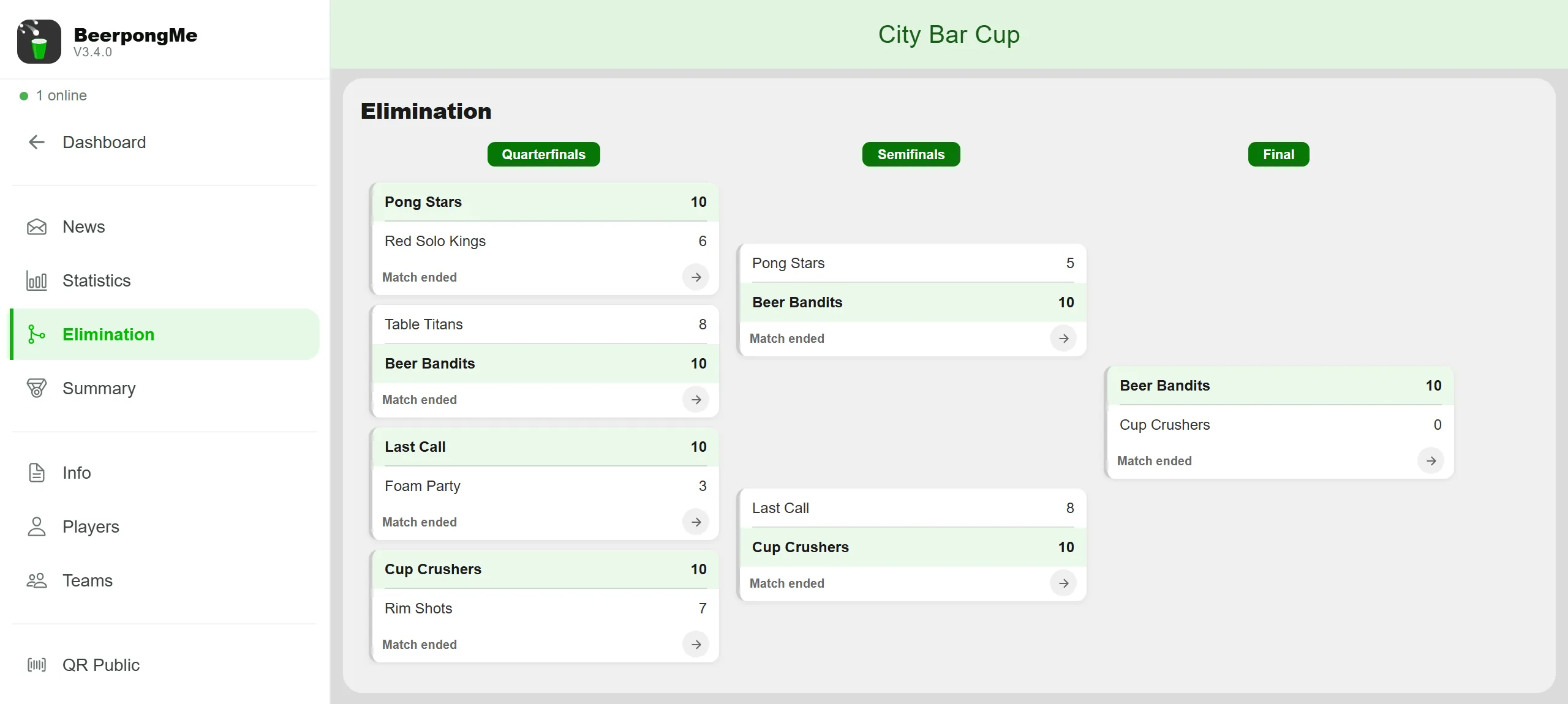
In the group stage, the “All” view shows every group at a glance. The info icon next to “Preliminary Round” explains how the tables are sorted - which order has proven itself for ties is covered in Beer pong tournament rules.
With 30 teams, nobody enjoys hunting for their own game. The search field in the preliminary round, the knockout bracket and the schedule finds it by team or player name: in the preliminary round only the matching game cards stay visible (the standings stay complete), and in the knockout bracket the matches are highlighted.
If a team has no players left during the tournament, the opponent wins by forfeit: the match counts as a walkover, with no cups on either side. In the group stage and round robin this applies straight away to all of that team’s open games; in the Swiss system the team is no longer drawn. That way no match is left hanging that nobody can play anymore.
After the tournament: share the result and run it again
Once the last match is played, the summary shows the podium. In single elimination without a third-place match there are two third places - both semifinal losers.
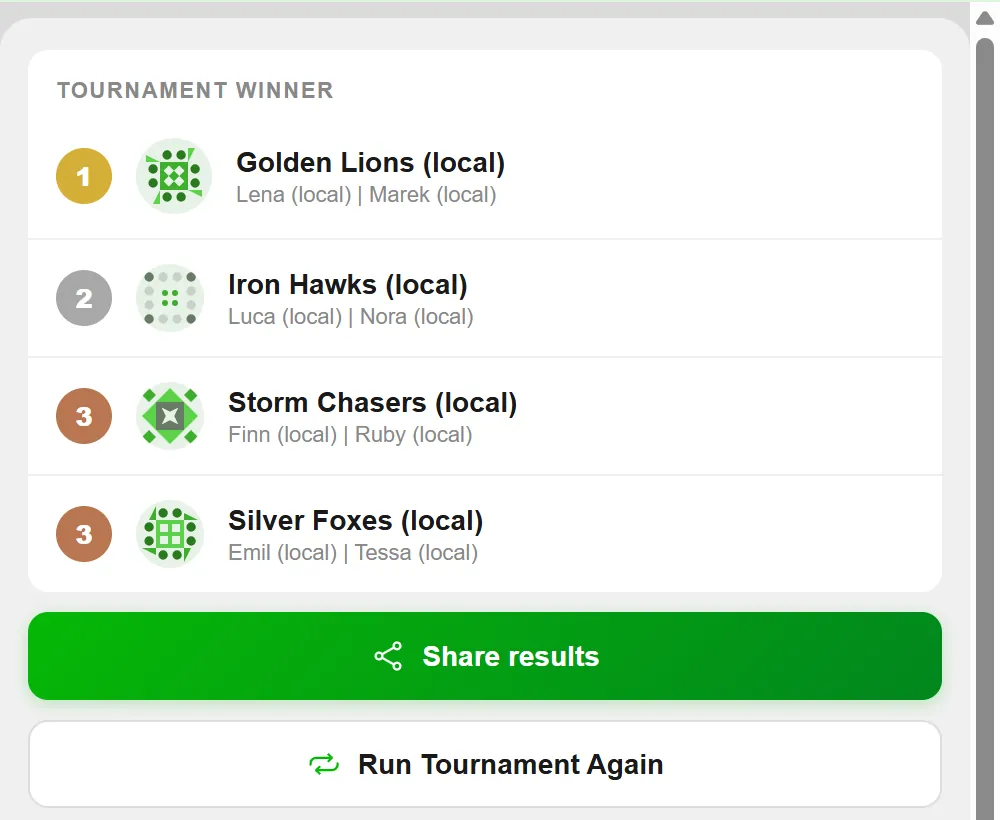
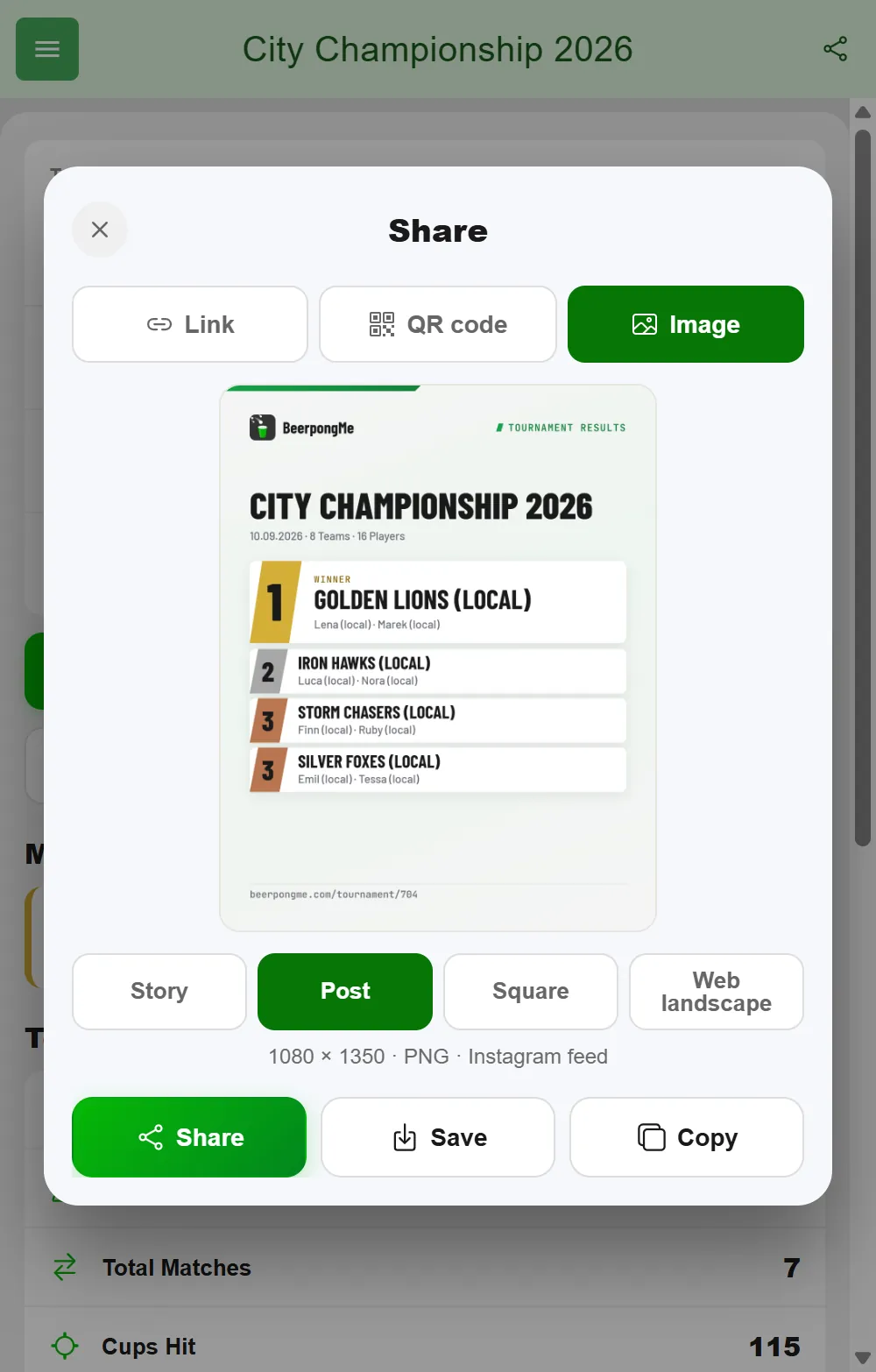
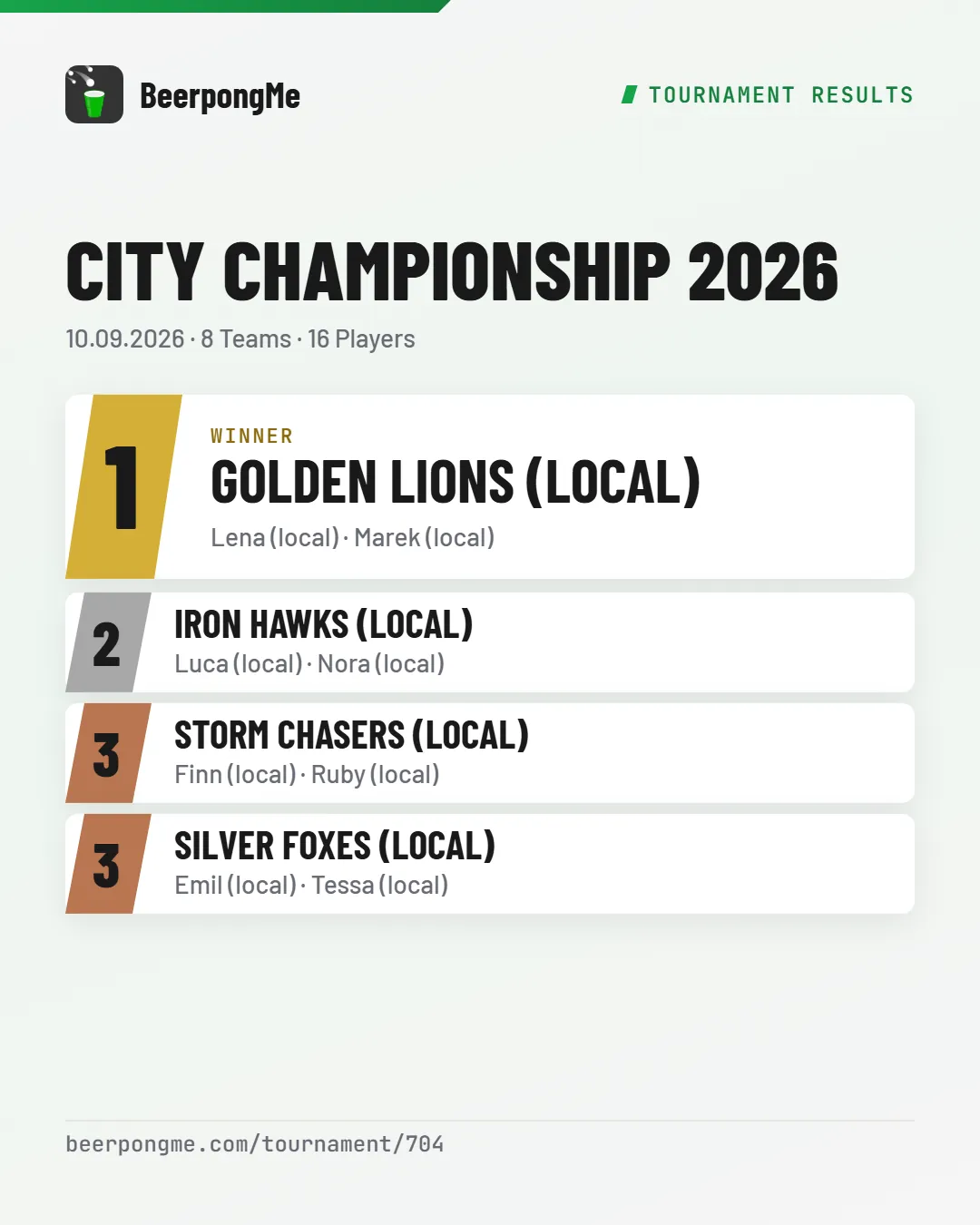
With “Share results”, BeerpongMe creates a ready-made graphic for Instagram, WhatsApp and the like: tournament name, date, podium with player names, number of teams and players. For public tournaments the link to the tournament page sits underneath; for private ones, just beerpongme.com. The image comes in four formats - Story (1080 × 1920), Post (1080 × 1350), Square (1080 × 1080) and Web landscape (1920 × 1080) for a website or projector. Send it straight on with “Share” or keep it on your phone with “Save”.
During the tournament you can share more than the link, too: “Share” in the header of the tournament page gives you the group standings (as a series of images when there are many groups) and the bracket as ready-made graphics. Who besides you may share such images is up to you: it’s the “Content sharing” switch in the tournament settings. It is on by default; when it’s off, only the creator can share result images.
With “Run Tournament Again” - only for you as the creator - you set up the next tournament with the same settings. The creation flow opens with everything pre-filled: format, settings, house rules, description, contact information and the local teams. You can’t enter teams with an app account yourself; they’re listed as returning teams above the QR code and join again on their own. Referees, admins and paid coins are not carried over. A name like “Wagon Pong 48” is automatically counted up to “Wagon Pong 49”.
Tables, equipment, schedule
Rules of thumb for tournament logistics:
- 1 table per 4–6 teams is a good guideline. For 16 teams: 3–4 tables.
- 15 minutes per match is a realistic average duration. Some matches go faster, others take longer (overtime).
- Have cups and balls ready in triple the needed quantity - balls get lost.
- Plan a break after each round, especially for group-stage formats.
Tables and schedule in the app
The eternal question “when are we up, and where?” is answered by the schedule. For that, you tell BeerpongMe beforehand which tables you play on:
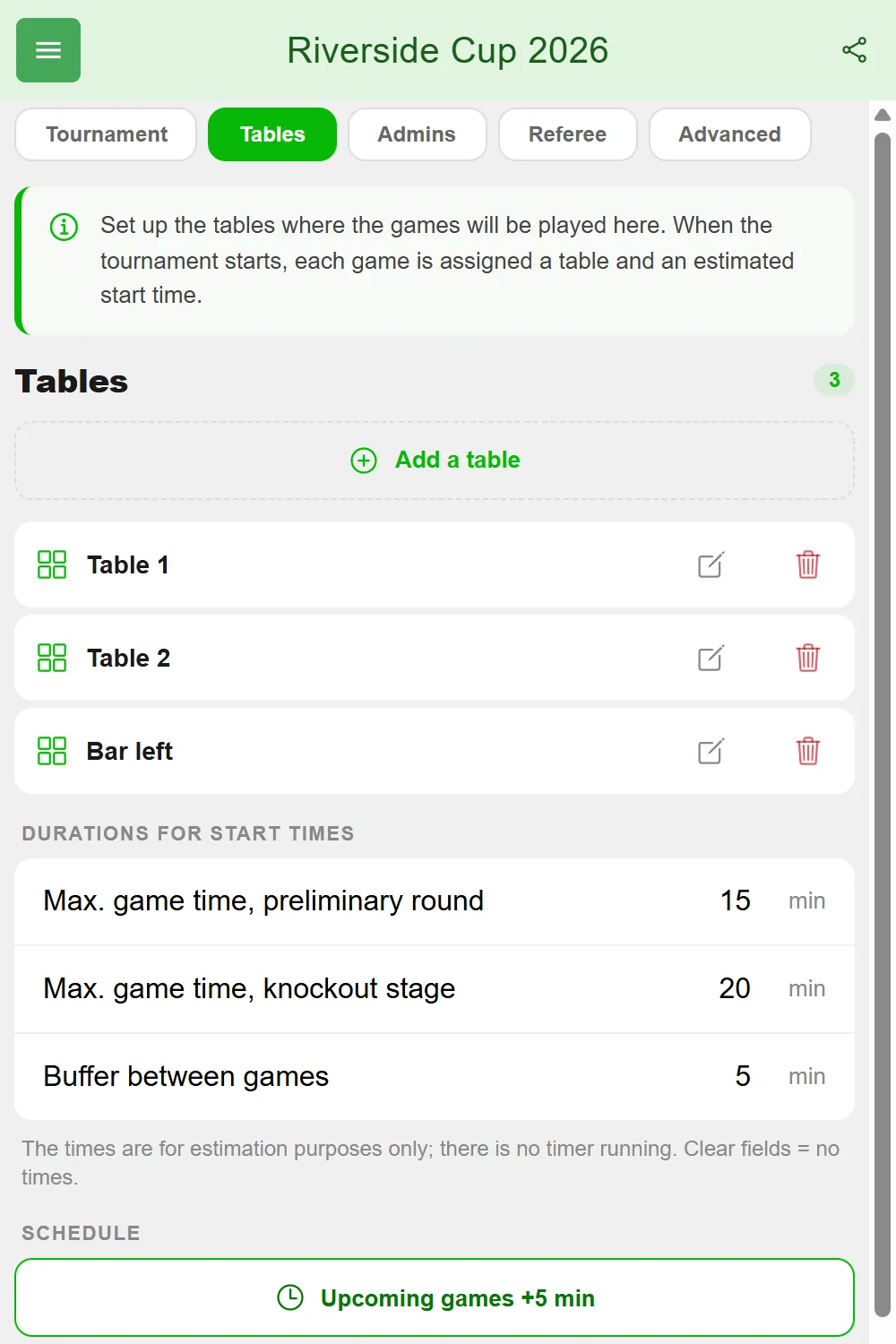
- Open the tournament settings and switch to the “Tables” tab. Only you and your admins see it.
- Tap “Add a table” and enter a name, for example “Table 1” or “Bar left” (1 to 50 characters, no emojis). Up to 50 tables are possible.
- Check the durations below: the maximum game time in the preliminary round, in the knockout stage, and the buffer between two games. With the first table, 15, 20 and 5 minutes are filled in. If you clear the fields, you get tables but no start times.
- Start the tournament. Now every game gets a table and an approximate start time.
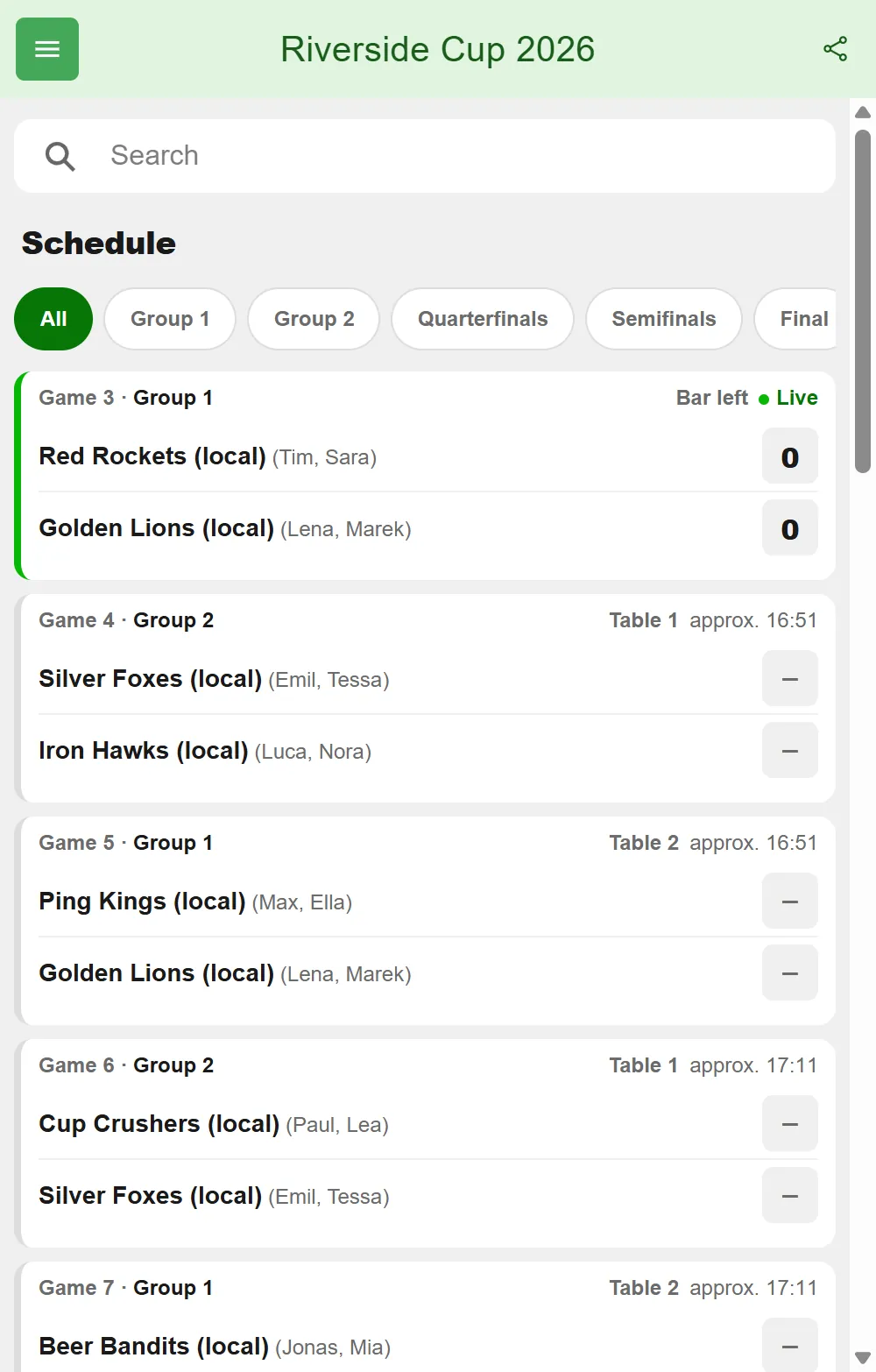
The schedule is in the tournament menu and on the public tournament page. It lists all games in order, each with its game number, table and time (“approx. 20:45”). If a team isn’t decided yet, it says something like “Winner of game 10”. The filters at the top narrow it down to one group or knockout round. The game cards in the preliminary round and the knockout bracket show table and time as well.
If the night runs late, tap “Upcoming games +5 min” in the “Tables” tab - the start times of all games that haven’t started yet move back by five minutes, and the tables stay the same. You can do that as often as you like. Important: the times are an estimate; BeerpongMe doesn’t stop any game and has no timer. How to enforce a real time limit is covered in Beer pong tournament rules.
Public tournament vs. private event
New tournaments are public by default. Public tournaments show up in the “Discover” section and are visible to all BeerpongMe users. If you want to attract players beyond your own circle of friends, that’s exactly right. For internal events (bachelor parties, company tournaments), turn off the “Public” toggle under “More options” while creating the tournament, or later in the settings - then only participants see the bracket.
Public tournaments can also be viewed via the URL /tournament/<id> by spectators without an account - bracket, live score, and statistics. Keep in mind that the names of local players and your contact information show up there too. Private tournaments, on the other hand, are not publicly accessible: visiting their URL without access leaves the content locked.
What BeerpongMe does better than an Excel bracket
Traditionally, beer pong tournaments were organized with a paper bracket or Excel. BeerpongMe brings three things you don’t get on paper:
- Live updates for all spectators in real time - no more “where are we right now?” shouting
- Automatically advancing bracket - the winner moves forward, and in double elimination the loser moves to the loser bracket, all without manual work
- Persistent statistics - all match data ends up in player profiles instead of the recycling bin
For a detailed comparison with other beer pong tournament apps, see the article Beer pong app comparison.
Frequently asked questions
Which tournament formats does BeerpongMe support?
BeerpongMe supports single elimination, double elimination, a group stage followed by a knockout bracket, round robin, and the Swiss system. The preliminary-round format and the knockout format can be combined, and with a preliminary round you can also skip the knockout round entirely. That covers all common beer pong tournament formats.
How many teams can a BeerpongMe tournament have?
You can sign up to 96 teams. Up to 64 make it into the knockout bracket; with a preliminary round on “Auto”, half of the teams advance, rounded down to 4, 8, 16, 32 or 64 and at least 4. In practice, 8, 16, 32 or 64 teams work best because they produce clean knockout brackets without byes. For odd numbers of participants, the Swiss system is recommended.
Can spectators follow the tournament live?
Yes. Every public tournament has a public URL in the form /tournament/<id>. The schedule, bracket, live results, standings and statistics can be viewed there without logging in, and the page refreshes itself while the tournament is running.
Can I plan tables and start times for the games?
Yes. In the tournament settings, under “Tables”, you set up the tables you play on and how long a game takes at most. When the tournament starts, every game gets a table and an approximate start time, both shown in the schedule. If the night runs late, “Upcoming games +5 min” pushes all games that haven't started yet back. There is no timer - the start times are an estimate.
Does the tournament start automatically at the planned time?
No. The planned start is just a heads-up for participants: it shows in the tournament overview, on the tournament page and on the public page. The tournament only starts when you tap “Start a tournament”.
Does every tournament game have to be tracked throw by throw in the app?
No. The creator, referees and tournament admins can enter the final score directly with “Enter result”, for example when a table kept score on paper. That ends the game and the bracket moves on. Detailed stats such as throws and hits per player are not recorded for that game.
How long does a beer pong tournament with 16 teams take?
With several tables and an average of 15 minutes per match, a single elimination tournament with 16 teams takes roughly 2 to 2.5 hours. Double elimination and group-stage formats take correspondingly longer because each team plays more matches.
Is the tournament played 2 vs. 2 or 4 vs. 4?
That's up to you. The lineup size ranges from 1 vs. 1 to 4 vs. 4, applies to the entire tournament, and cannot be changed once it has started. Each team then picks the players actually competing from its squad under Teams.
Can people without a BeerpongMe account take part in the tournament?
Yes. With local teams you enter players by name only, without an account and without installing the app - even many at once, as a list with one line per team. They play in the tournament as normal and appear in the tournament standings, but they don't collect lasting statistics.
Can I run a tournament again with the same settings?
Yes. On the summary of a finished tournament, tap “Run Tournament Again”. Format, settings, house rules, description, contact information and local teams are carried over. Referees, admins and paid coins are not - the costs come due again at the start.
What happens if a team has no players left during the tournament?
Then the opponent wins by forfeit. The match counts as a walkover, with no cups on either side. In the group stage and round robin this applies straight away to all of that team's open games; in the Swiss system the team is no longer drawn in the following rounds. Matches already running are not affected.