Beer Pong Tournament Registration: Teams Sign Up via a Link
Jump to the FAQRegistration for a beer pong tournament often runs through Instagram DMs, a WhatsApp group and a list only the organizer understands. Two weeks before the event, nobody knows for sure who’s in, who only asked, and whether “The Cup Heroes” and “Cup Heroes” are the same team.
Tournament registration via a link gives this its own page: you share a link or QR code, teams sign up there without an account, and you decide in the app who gets into the tournament. This article shows how to set up registration for your beer pong tournament, what teams see, and where the limits are.
How beer pong tournament registration works
- You turn on registration for your tournament and share the link.
- A team opens the link, enters a team name and players, and submits the form.
- The team gets a status link that shows where its registration stands.
- You see the registration in the tournament under “Teams” and accept or reject it.
- Accepted teams join the tournament as local teams, meaning teams whose players are entered by name only and don’t need an account.
The registration page isn’t a premium feature and costs nothing. As always, you only pay when the tournament starts, and accepted teams count like all the others.
Step by step: set up registration
Registration is only available while the tournament hasn’t started. How to create a tournament in the first place is covered in Organize a beer pong tournament.
- Open your tournament and go to the tournament settings. Before the start, the menu item is called “Start a tournament”.
- Switch to the “Registration” tab.
- Turn on “Registration active”.
- If you like, set a registration deadline. After it, registration closes by itself. You can still accept or reject pending registrations.
- Under “Close at … teams”, enter the maximum number of teams you want. The limit counts teams in the tournament and pending registrations together. If you reject a registration or a team drops out, registration opens again.
- Under “Registration link” you copy the link or show the QR code. You can send the link anywhere: your Instagram bio, a story or the WhatsApp group. Print the QR code on a poster.
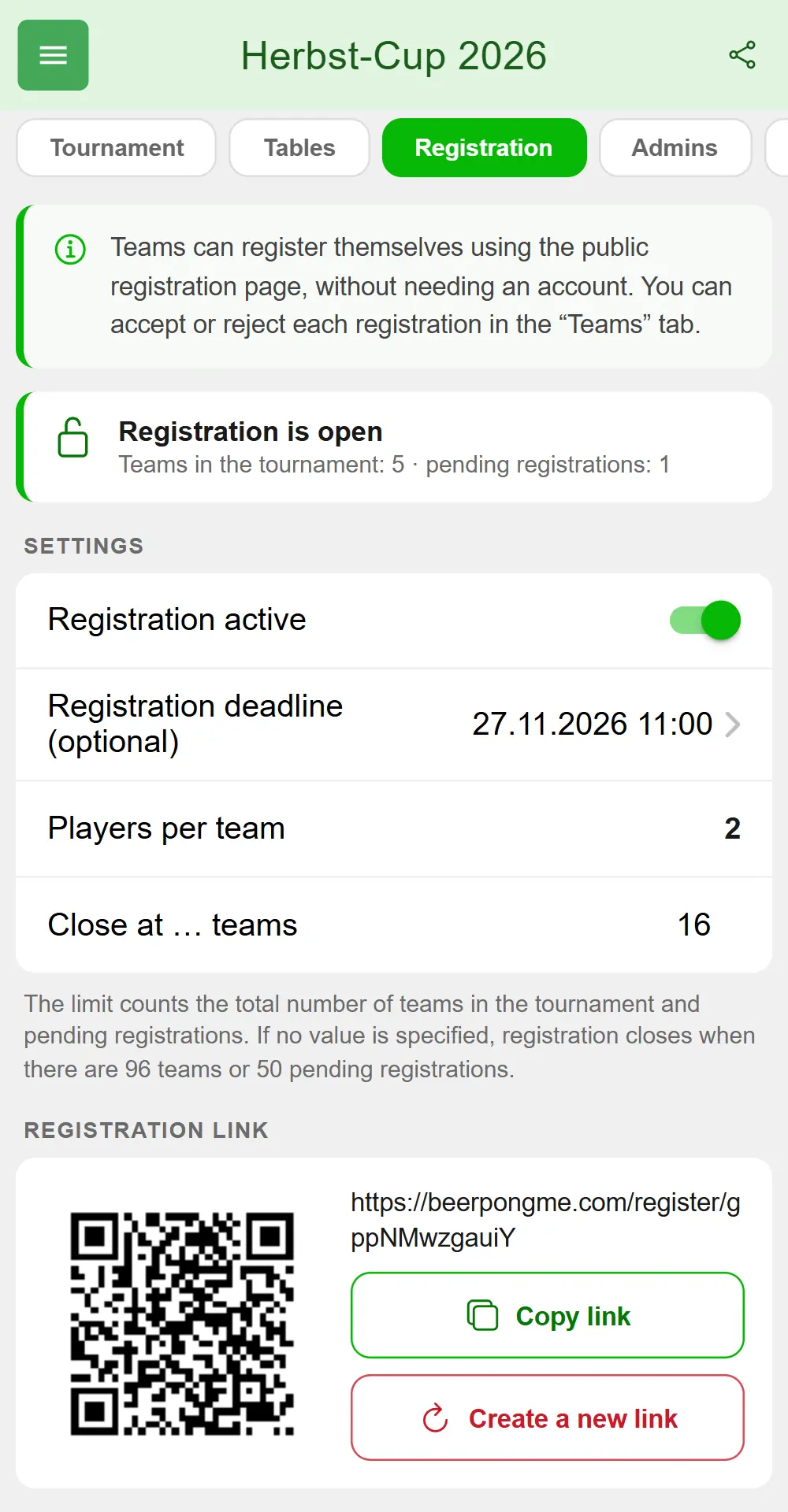
At the top of the tab you see whether registration is currently open or closed, and how many teams and pending registrations there are. You as the creator and tournament admins with the right “Remove players and teams” can change these settings.
How many players per team?
That follows your tournament’s lineup size, meaning how many players per team stand at the table, from 1 vs 1 to 4 vs 4. If you play 2 vs 2, the form asks for exactly two players, and the tab shows “Players per team: 2”. There’s nothing to set up.
Incomplete teams aren’t possible: anyone who enters fewer players than required can’t submit.
Add your rules and the venue
If you’ve set house rules for the tournament, every team has to tick “I accept the organizer’s rules” before submitting. Tapping the link opens the rules in a window. Without house rules, there’s no checkbox.
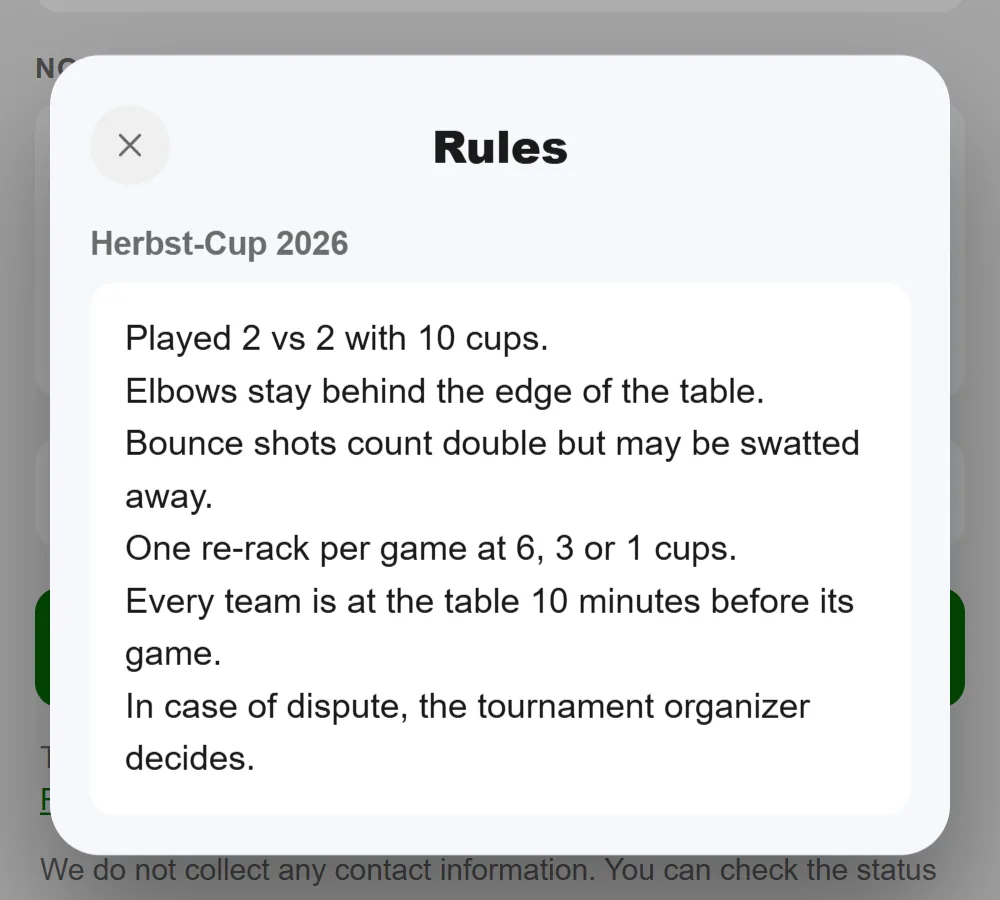
The registration page shows the tournament name and, if set, the planned start. It doesn’t show a venue. So write the venue, admission time and entry fee into your house rules, and every team will have read them before signing up.
What teams see
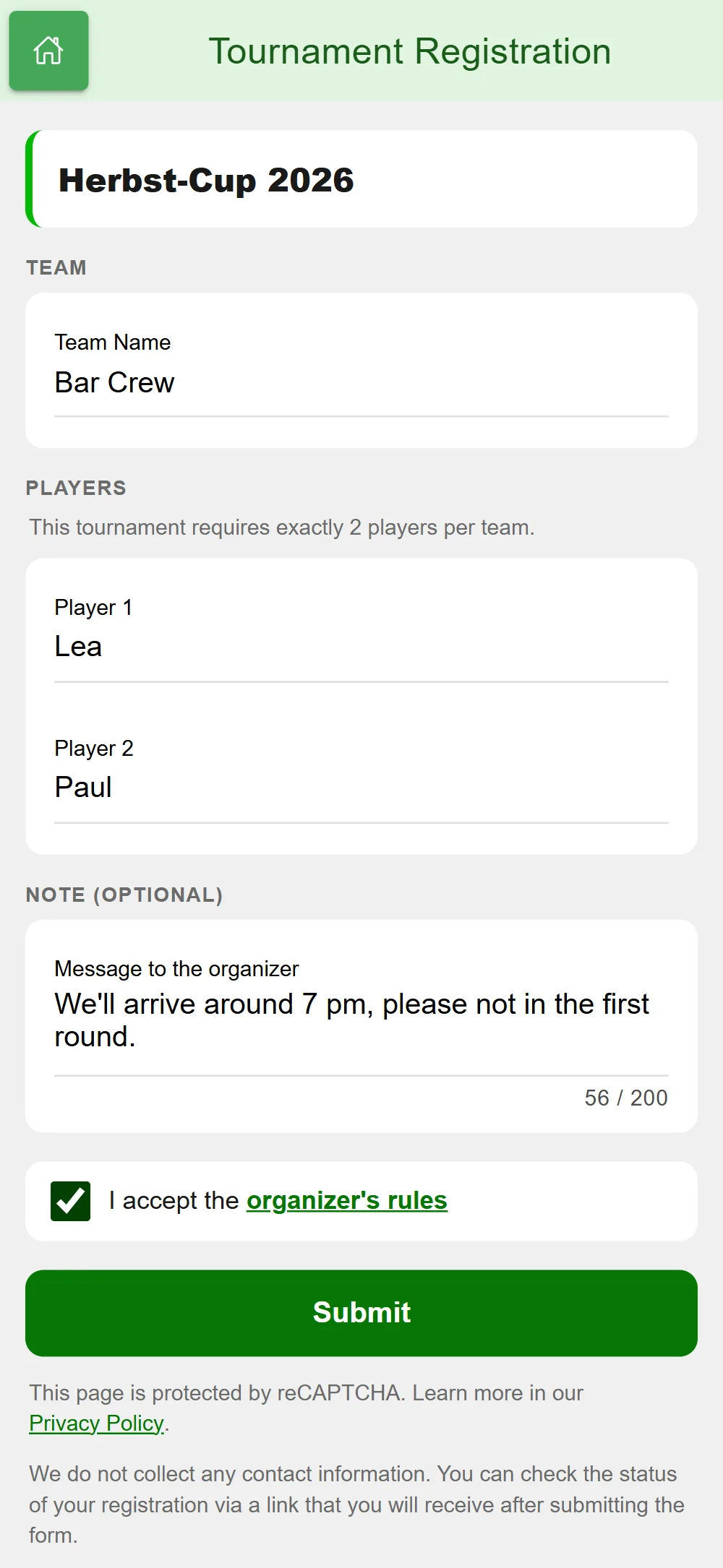
The form is built for phones and needs neither the app nor an account:
- Team name, up to 20 characters
- Player 1, Player 2 …, one field per player, up to 15 characters each
- Note, optional, up to 200 characters, for example “We’ll arrive around 7 pm”
- the checkbox for the rules, if you have any
Every field is checked right away, and the error appears directly below it: a name is missing, too long, or appears twice in the same team. A team name can’t contain “/” or “#”, can’t consist of digits only and can’t be “BYE”, because BeerpongMe uses that for byes. Emojis don’t work in any field. If a team name is already taken in the tournament, the form says so when submitting.
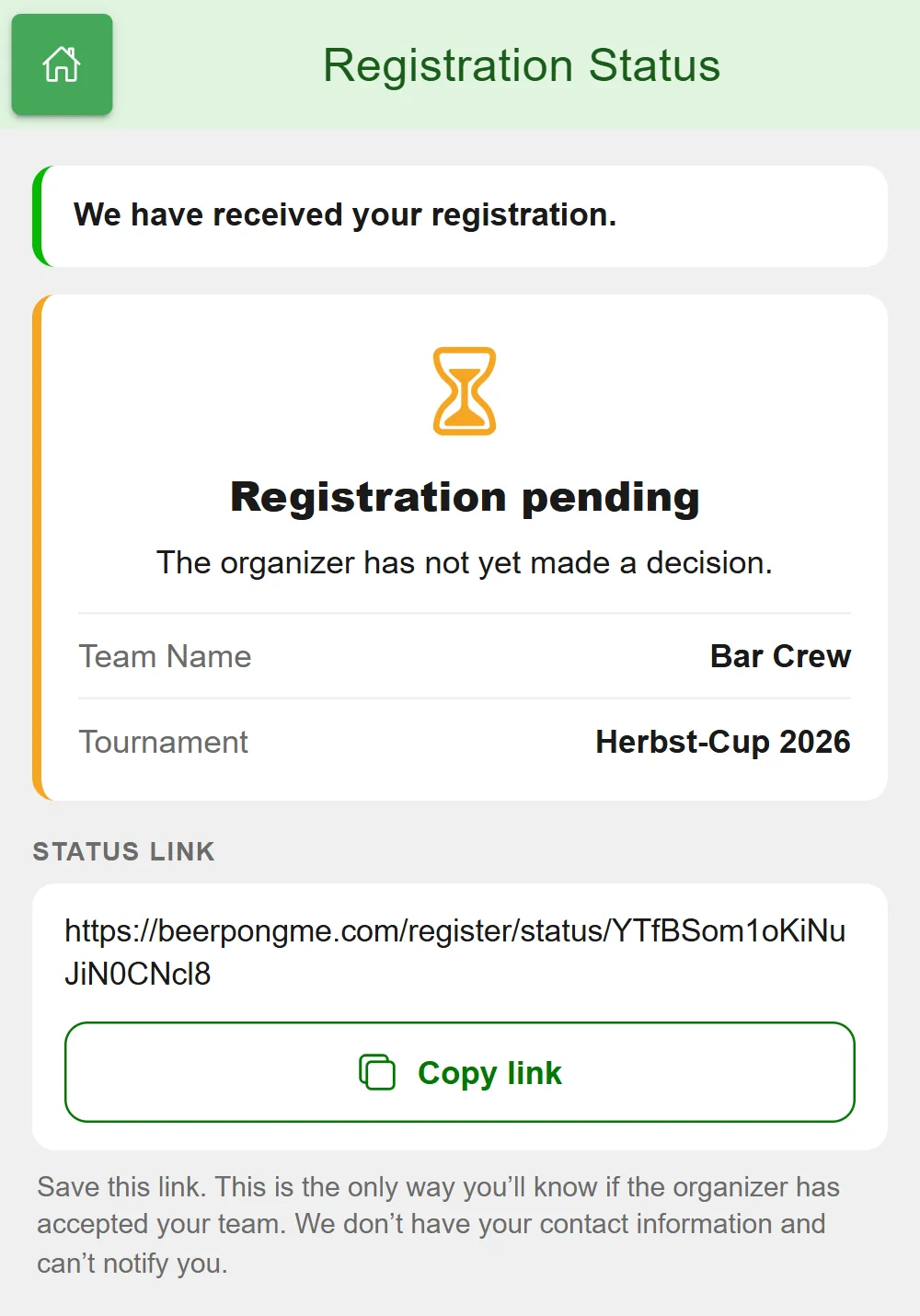
After submitting, the page shows the status link with a “Copy link” button. The team should save it, because BeerpongMe doesn’t ask for a phone number or email address and can’t notify anyone. Through the link, the team can always see whether the registration is pending, accepted or rejected.
Accept or reject registrations
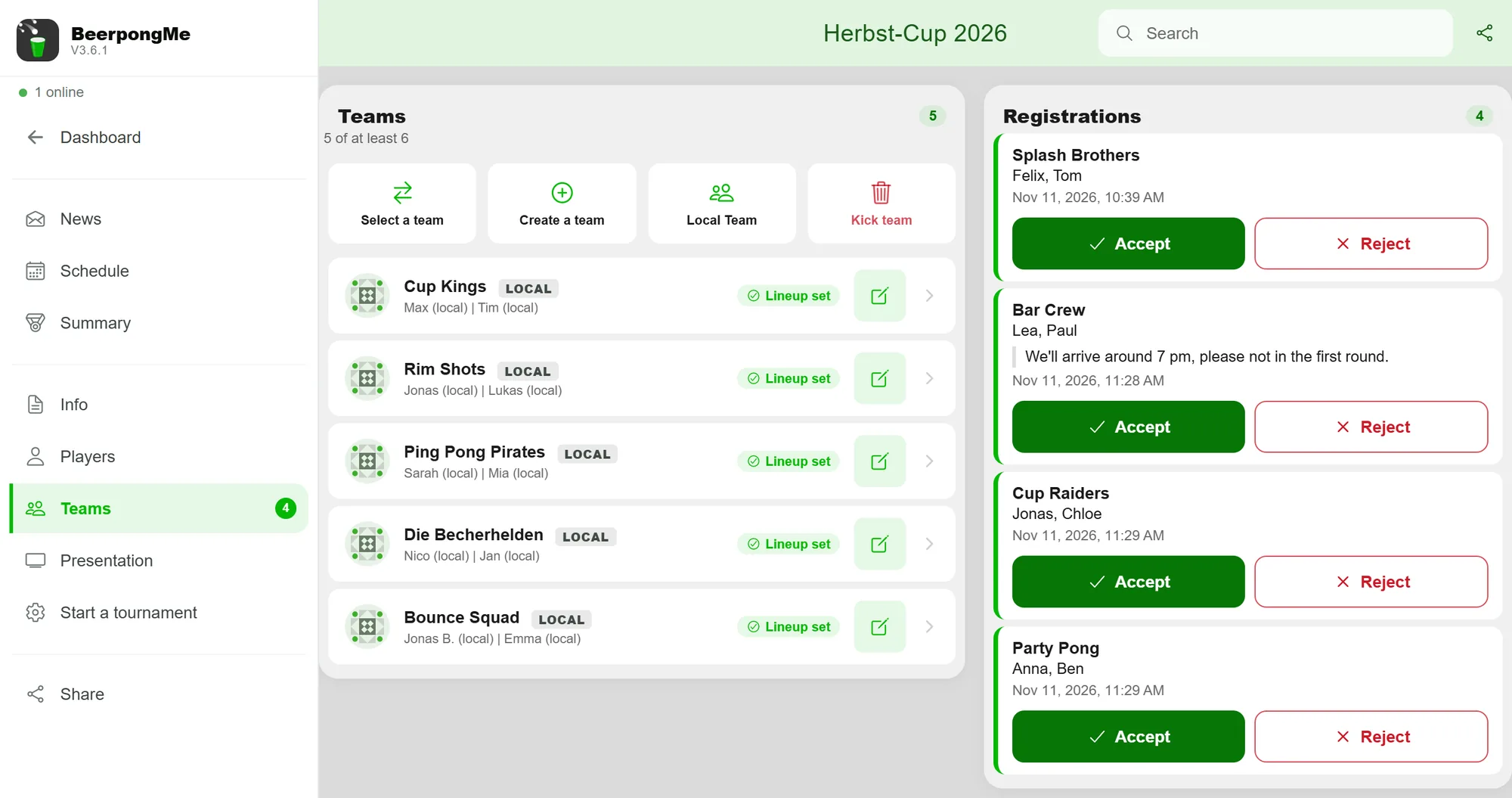
New registrations arrive live in the app: a counter appears on the “Teams” menu item, and there you’ll find the “Registrations” section with team name, players, note and time, oldest first. On a computer, registrations sit to the right of the team list; on a phone, above it.
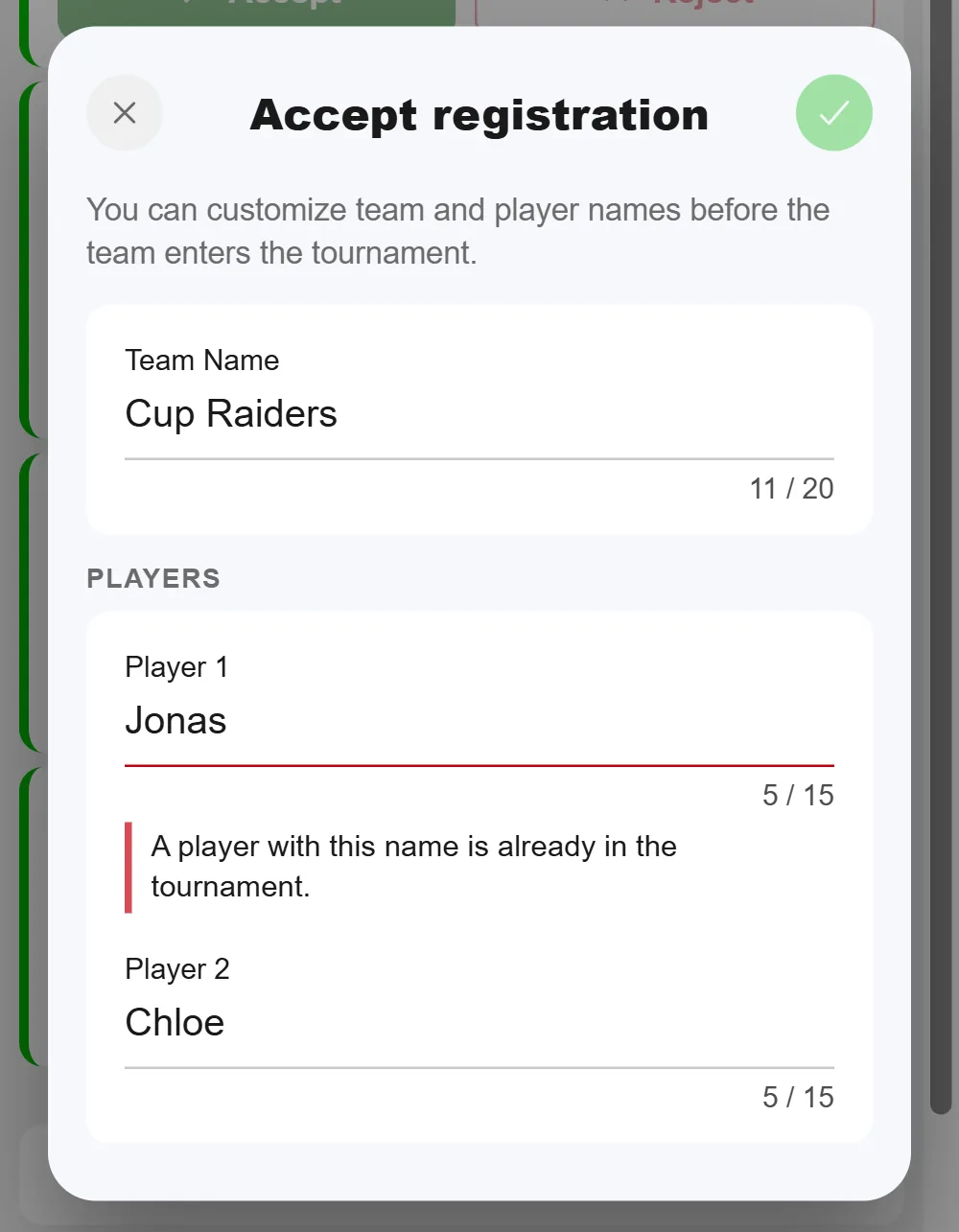
Accept: Tap “Accept”. In the dialog you can still adjust team and player names before the team joins the tournament. That matters because names have to be unique within the tournament: if there’s already a “Max” or a team with the same name, the dialog highlights the field and you change it to “Max K.”, for example. The team then appears as a local team in the list, and its status link shows “Registration accepted”.
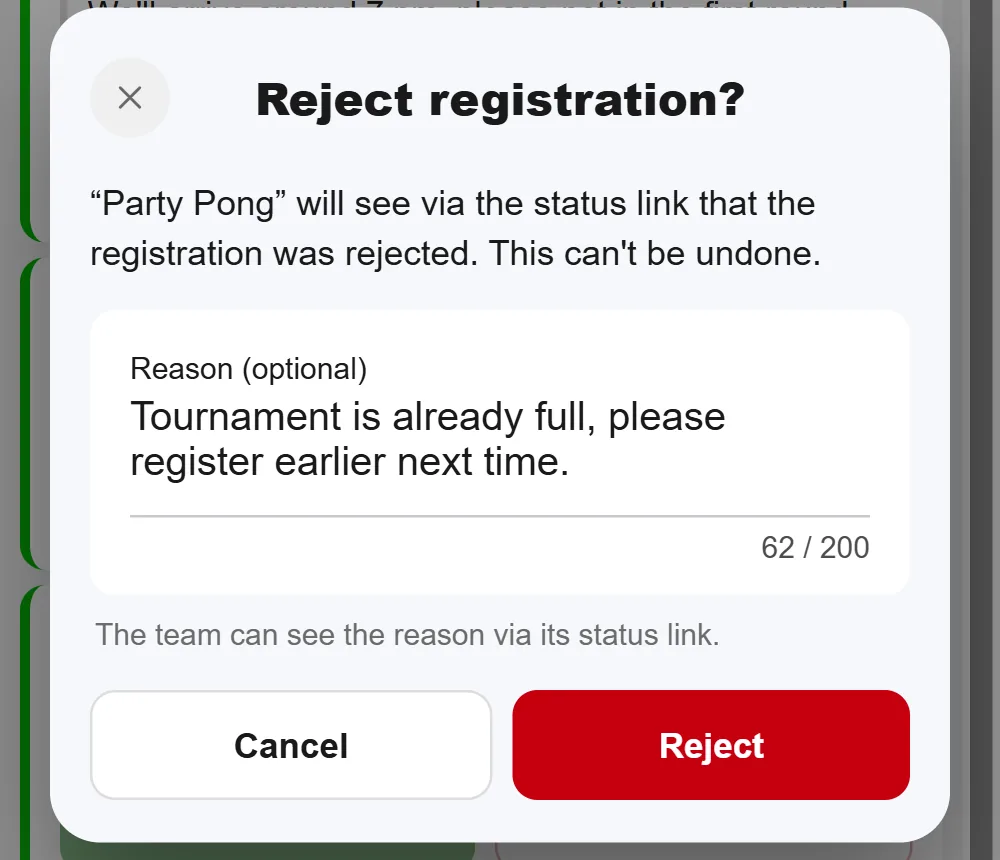
Reject: Tap “Reject”. Optionally you add a reason of up to 200 characters. The team sees it through its status link. Rejecting can’t be undone, which is why the app asks first.
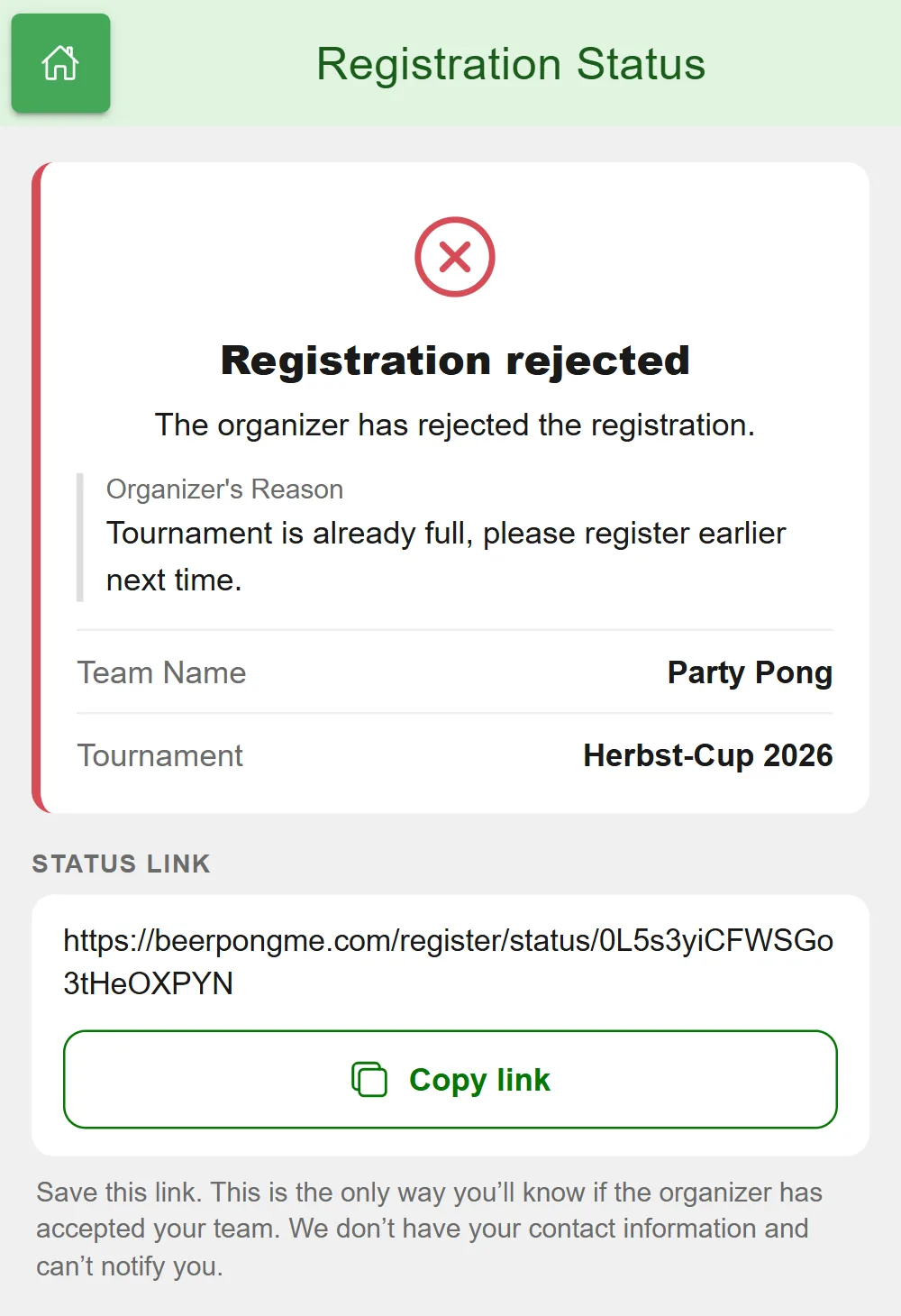
The team then sees the rejection and your reason on its status link:
If two admins handle the same registration at the same time, the first one wins. The second gets a notice, and the list reloads.
When registration is closed
The page stays reachable, but the form is locked, and a large “Registration is closed” notice with the reason appears at the top. That happens when
- you turn off “Registration active”,
- the registration deadline has passed,
- your limit under “Close at … teams” is reached,
- the tournament is full with 96 teams,
- 50 registrations are pending at the same time; the page then asks people to try again later,
- the tournament has started.
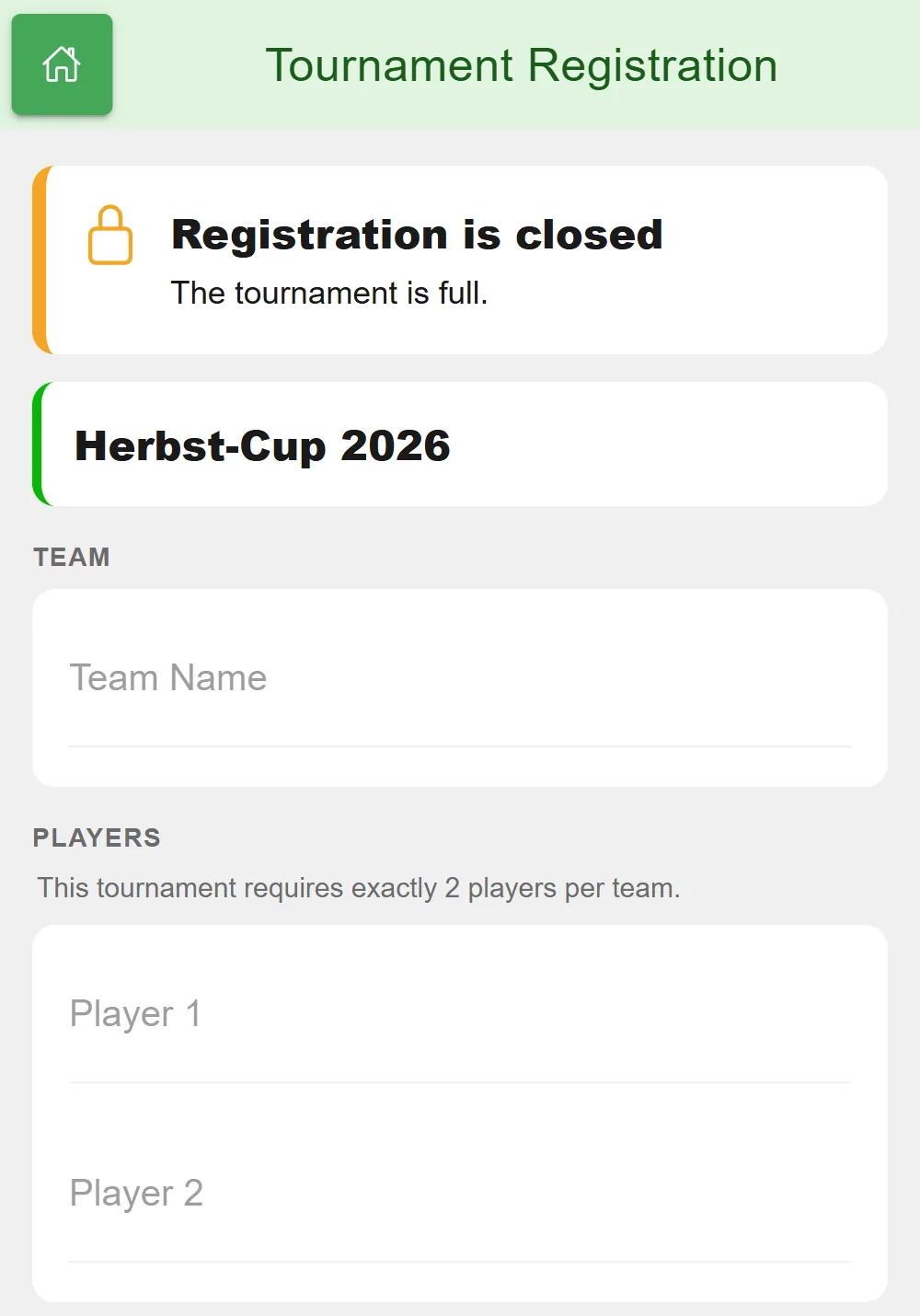
If you turn registration off, pending registrations remain and you can keep handling them.
If a link ends up in the wrong hands, say in a stranger’s group chat, tap “Create a new link”. The old link and every QR code you already printed stop working immediately. Registrations you already received and their status links stay valid.
At the start: what happens to registrations
When the tournament starts, BeerpongMe cleans up: all registrations are deleted, whether pending, accepted or rejected. The status links then show “No longer available”. Accepted teams are regular teams in the tournament by then and play as normal.
Pending registrations expire in the process. So this doesn’t happen by accident, the start dialog tells you how many registrations are still pending. Go through the list beforehand.
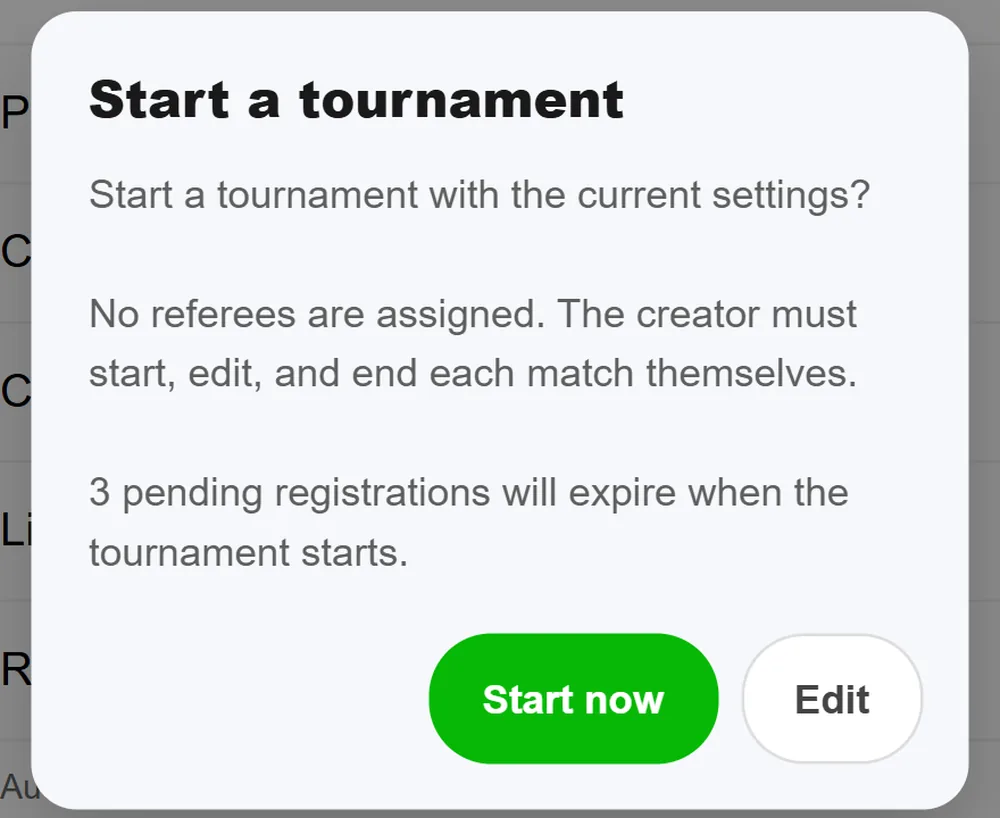
As soon as you accept or reject a registration, BeerpongMe deletes the player names and the note from it. Until the start, only the team name, the status and, if given, your rejection reason remain for the status link.
A long registration period is no problem: a tournament that never starts is deleted automatically after three months, but every new registration moves that date so that at least 14 more days remain. How to extend it otherwise is covered in Organize a beer pong tournament.
Limits you should know
- Registered players are local players. They play as normal and appear in the tournament ranking, but don’t collect stats beyond the tournament. Anyone who wants to keep their numbers joins with their BeerpongMe team via the join code instead of the registration. Both can be mixed in the same tournament. More in Play beer pong without an account.
- No email notifications, neither to teams nor to you. You see new registrations in the app; teams see their status through the status link.
- No entry fee through the page. Registration only collects names. You collect the entry fee yourself as before, for example at the door on the night.
- Registrations from one connection are limited. At most 20 registrations per hour go through from one internet connection. For sign-ups on the night at the venue, when everyone is on the same Wi-Fi, it’s better to enter the teams yourself as local teams.
- Links open in the browser. Even people who have BeerpongMe installed land on the website with the registration link, not in the app.
Who this is for
Registration via a link is meant for tournaments where teams sign up in advance: a public bar tournament, a tournament in a scene with fixed teams, or a club event with a poster. What goes with it on the night is covered in Beer pong tournament night at your bar and Beer pong tournament at a club event.
If you already know the teams, say for a bachelor party or a company event, it’s faster to enter them directly as a list, as described in Organize a beer pong tournament. And if you’ve already set up your tournament in Tournify, you bring over teams and groups with the tournament import.
Frequently asked questions
Do teams need an account to register for a beer pong tournament?
No. Whoever opens the registration link enters a team name and players and submits the form, without an account and without the app. Once you accept the registration, the team joins the tournament as a local team.
Does online registration cost anything?
No. The registration page is free for every organizer. As always, you only pay when the tournament starts, and accepted teams count like every other team in the tournament.
How does a team know whether it was accepted?
After submitting, the team gets a status link. It shows whether the registration is pending, accepted or rejected, and in case of a rejection also your reason. The page doesn't ask for contact details, so there are no email notifications.
How many teams can register?
A tournament holds up to 96 teams, and at most 50 registrations can be pending at the same time. With “Close at … teams” you set your own limit; it counts teams in the tournament and pending registrations together.
What happens to pending registrations when I start the tournament?
They expire. When the tournament starts, BeerpongMe deletes all registration data, and the status links then show “No longer available”. The start dialog warns you beforehand how many registrations are still pending. Accepted teams of course stay in the tournament.
Can I withdraw the registration link?
Yes. With “Create a new link” the old link and its QR code stop working immediately. Registrations you already received and their status links stay valid.